Configure water service prices
Set drinking-water and sewage prices, choose the completed-payment log thread, and publish the Water Company panel in Discord.
Before you begin
- You need owner or administrator access to your Discord server in the CoreRP dashboard.
- Configure the CoreRP economy and bank. Water uses the saved server country and currency.
- To run
/admin panel, you need the Discord Manage Messages permission and access to CoreRP administrator commands. - In the panel channel, CoreRP needs View Channel, Send Messages, and Embed Links.
- In the Water Company log thread, CoreRP needs View Channel, Send Messages in Threads, and Embed Links.
Configure the prices and log thread
-
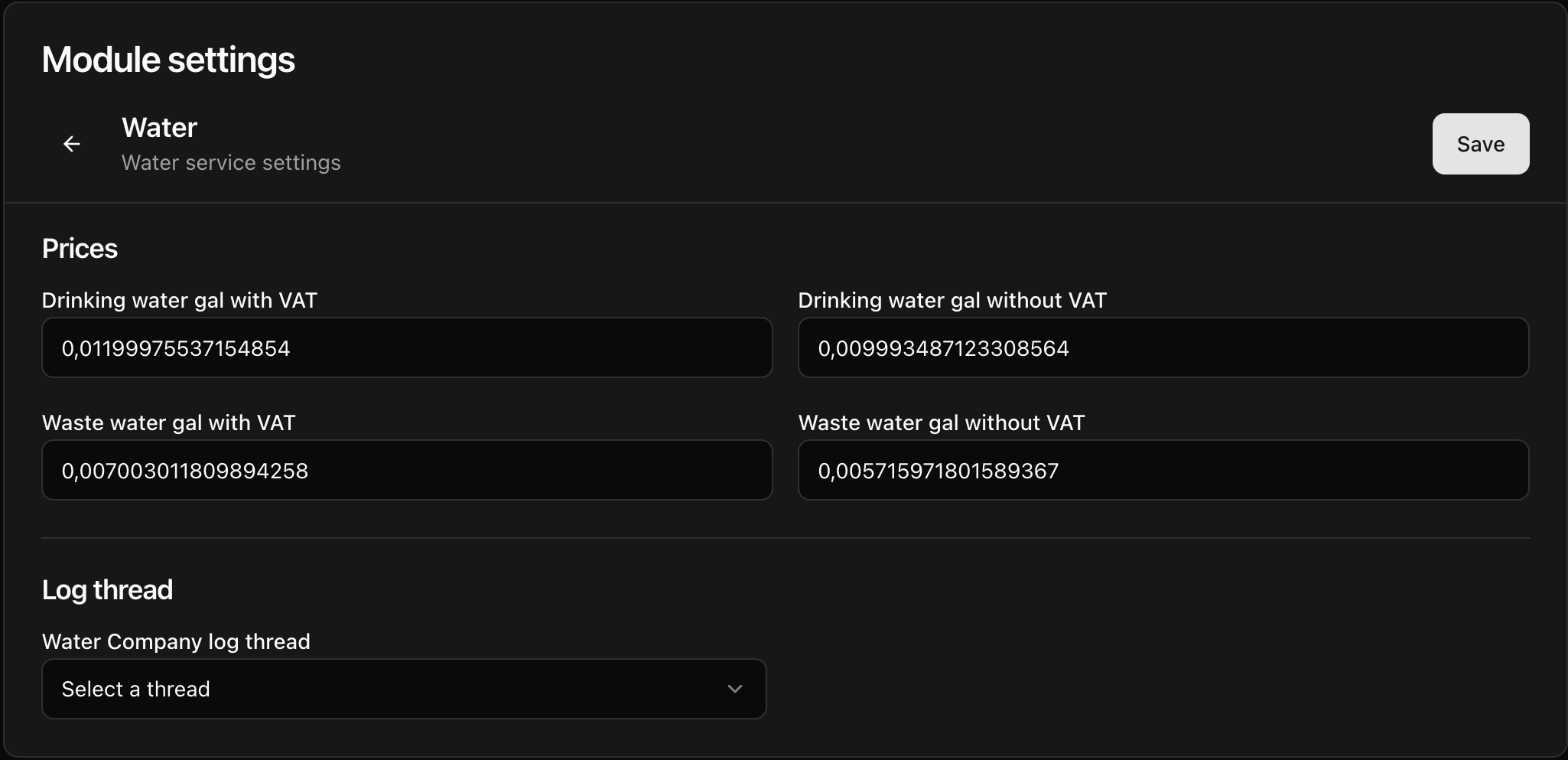
Open the CoreRP dashboard, select your Discord server, then open Module settings → Services → Water.
-
Enter a nonnegative price in each of the four fields:
- Drinking water gal with VAT
- Drinking water gal without VAT
- Waste water gal with VAT
- Waste water gal without VAT
These are the labels on a U.S. server. CoreRP changes
galto the country-specific unit, such asm3for metric countries. Completed payments use the applicable with VAT price; the without VAT amounts are informational prices shown on the public panel.Use
0or a positive number. Leaving a field blank saves0. When a saved value is converted to another unit, the field may show additional decimal places after reload. This tutorial uses a U.S. drinking-water price with VAT of0.0120per gal. -
Under Water Company log thread, select the synchronized thread that should receive completed-payment records. If the selector is already unselected, leave it unselected when you do not want payment logs.
-
Select Save, reload the page, and confirm that all four prices and the selected thread still show the saved values.
Publish the Water Company panel
-
In Discord, run
/admin panel panel:Water Company channel:#your-channel.The
paneloption is required. Thechanneloption is optional; omit it to publish in the channel where you run the command. -
Confirm that CoreRP privately responds Panel was sent to this channel. and publishes the public Water company panel with drinking-water and sewage prices plus Pay for water.
After changing a price, save the settings and publish the panel again. Anyone with an open payment confirmation should cancel it and reopen the payment flow to see the current total.
Troubleshooting
- If CoreRP cannot publish the panel, confirm your administrator-command access and CoreRP's View Channel, Send Messages, and Embed Links permissions in the destination.
- If a completed payment has no log, check Water Company log thread and CoreRP's thread permissions.
- If the form reports a missing ID card or account, activate a citizen ID and primary bank account before submitting it again.
Next steps
Continue with paying a water bill for the full charge, balance, and payment-log workflow.