Find and copy CoreRP commands
Use CoreRP's Documentation page to find command syntax, read available details, and copy the command you need.
Open Documentation
You can use either entry point:
- Public: open CoreRP Documentation, or select Documentation in the website's top navigation. No sign-in or server access is required.
- For your server: sign in to the CoreRP dashboard, select your server, then select Documents in the sidebar.
You can also enter a command or feature in Module settings → Search modules, fields or commands... and select a command result to open its matching Documentation entry.
Find a command
- Enter a command name, category, description, or feature keyword in Search commands, categories or content.... Search is not case-sensitive.
- Review the matching groups. Nonempty content appears under Information, Prefix commands, Slash commands, or Ticket bot, with result counts for sections and categories.
- Expand a category when necessary. Matching categories normally open automatically while you search.
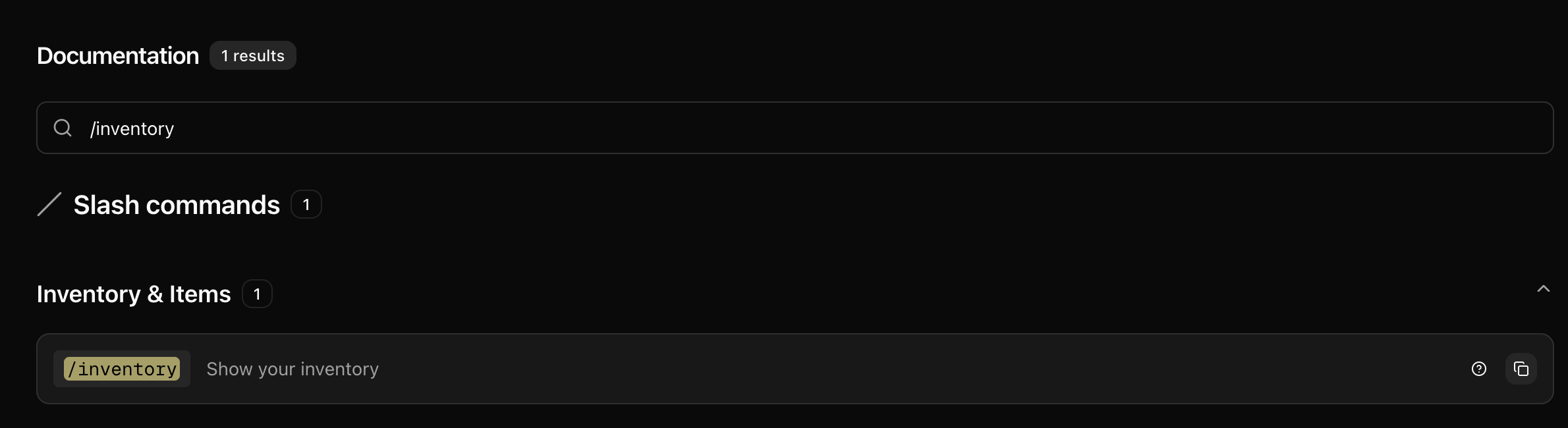
For the current English /inventory example, entering /inventory returns one result under Slash commands → Inventory & Items. The result shows /inventory with the description Show your inventory.
Read details and copy the command
- Select the question-mark control when it appears to read the command's optional details. Commands without extra details do not show this control.
- Select the copy control to copy the exact rendered command. A successful copy briefly changes the control to a green check and shows Copied!.
Slash commands are displayed with /. The signed-in Documents page uses the selected server's saved bot language and CoreRP command prefix; Ticket Bot commands use that bot's separately saved prefix. The surrounding page labels follow your website language.
Public Documentation has no selected server. Its prefix-command examples use !, including Ticket Bot examples, so they may not match your server. For server-specific syntax, use the signed-in page or confirm the command in Discord's command picker.
Troubleshooting
- No results for "..." and Try different keywords or categories — remove a leading
/or prefix, shorten the query, or search by the feature or category. Clear the search to restore the complete list. - If copying is unavailable, select and copy the displayed command text manually.
- A public prefix or command language differs from your server — select your server and use dashboard Documents, then confirm the final command in Discord.
Next steps
Continue with View your inventory and item details to use the verified /inventory command.