View your inventory and item details
Check the active character's inventory and view the details CoreRP stores for an item.
Before you begin
- Create your CoreRP character and ID card, then select the character whose inventory you want.
- CoreRP setup must be complete, and
/inventoryand/item showmust be enabled. Use them in a channel allowed by the server and follow any configured role or cooldown rules. - Items that are currently taken away do not appear in either command.
- Opening inventory or item details also clears expired confiscations. Items marked for automatic return become visible again; other expired confiscated items are permanently removed.
If the ER:LC Extension's Item view rule is Only in-game,
/item showrequires the active character to be online in the linked private server./inventorydoes not.
View your inventory
- Run
/inventory. It has no options. - CoreRP privately shows the active character's items. Check the character name at the top. Basic rows show a category icon, quantity, and item name.
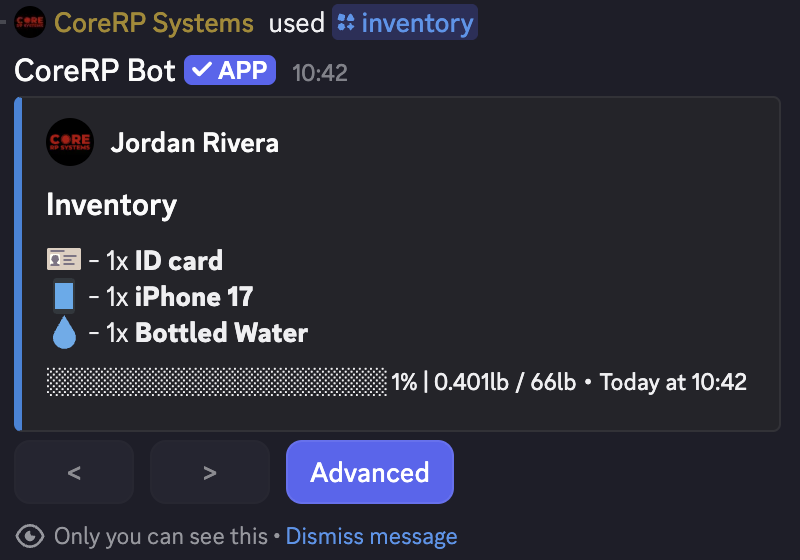
- Select Advanced to add each item's unit weight and quantity calculation.
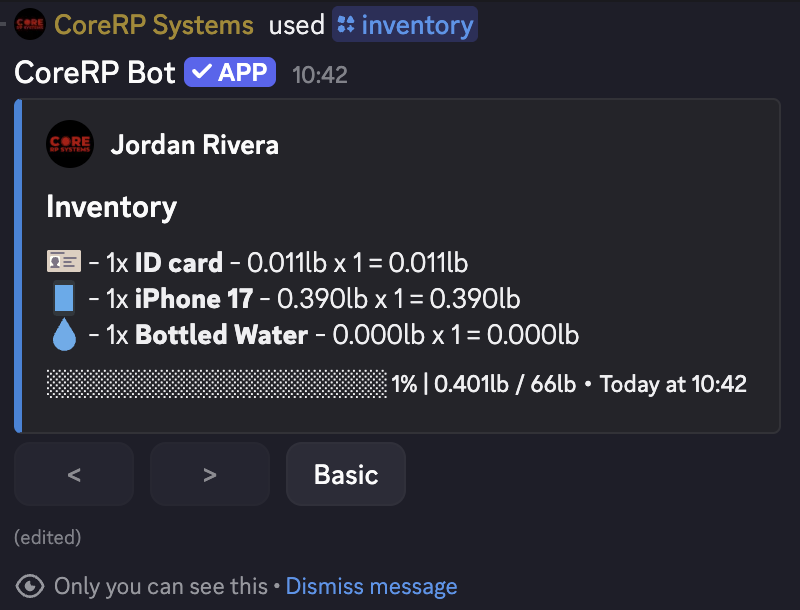
- Select Basic to return. Each page holds 10 rows; use < and > to change pages. The unavailable direction is disabled on the first or last page.
The footer shows a progress bar, rounded percentage, and current inventory weight in the server country's units. Weights come from the server's item definitions.
If you switch characters, run /inventory again before continuing.
View one item's details
/item show item:<item>
item is required. Start typing and select an autocomplete result. CoreRP offers up to 25 items you currently hold and shows each quantity.
CoreRP shows ID-card and filled-Paper details privately. Every other item result is public in the current channel.
The result depends on the item:
- ID card: private Your ID card with First name, Last name, and Birthdate from the active character.
- Filled Paper: private Content: with the saved text.
- Any other item: public You have 1x
Bottled Waterin your inventory. with No additional details are available for this item.
Troubleshooting
- You do not have a citizen ID. Create it in channel ... — create or select the intended character.
- Your inventory is empty. — the active character has no visible items; confirm the selected character.
- No autocomplete result, or You do not have an item named ... in your inventory. — check the active character, positive quantity, selected suggestion, and whether the item is taken away.
- You need to be in-game to use this command. — join the linked ER:LC server with the active character. An administrator must correct missing, invalid, or offline ER:LC configuration.
- Server setup required, a disabled response, or You do not have permission to use this here. — finish setup, enable the command, or use its allowed channel or role.
- Cooldown — wait for the displayed time.
Next steps
Continue with Give and discard inventory items, or create and manage item storage.