Create and configure inventory items
Create an inventory item in the CoreRP dashboard, configure how it behaves, and identify the Discord commands that can act on it.
Before you begin
- Complete CoreRP setup.
- You need owner or administrator access to your Discord server in the CoreRP dashboard.
- To use most inventory commands, the member must have an active citizen ID. See Configure ID cards and multiple characters.
Clothes, Medkit, and Lighter appear as item categories only when the ER:LC Extension is enabled.
Create the item
- Open the CoreRP dashboard and select your Discord server.
- Open Module settings, then select Items.
- Under Items management, select Add item.
- Enter a unique, descriptive item name and select its category. A blank name is replaced with a generic name such as
Item 1.

- Select the gear-shaped Settings button for the item.
- Enter the item's Weight. Enable Give to player on ID creation only when every newly created citizen ID should receive the item.
- Complete the setting that appears for the selected category. In this example,
Alcohol Itemis an Alcohol item with a weight of1 lband an Alcohol effect duration (minutes) of10m.
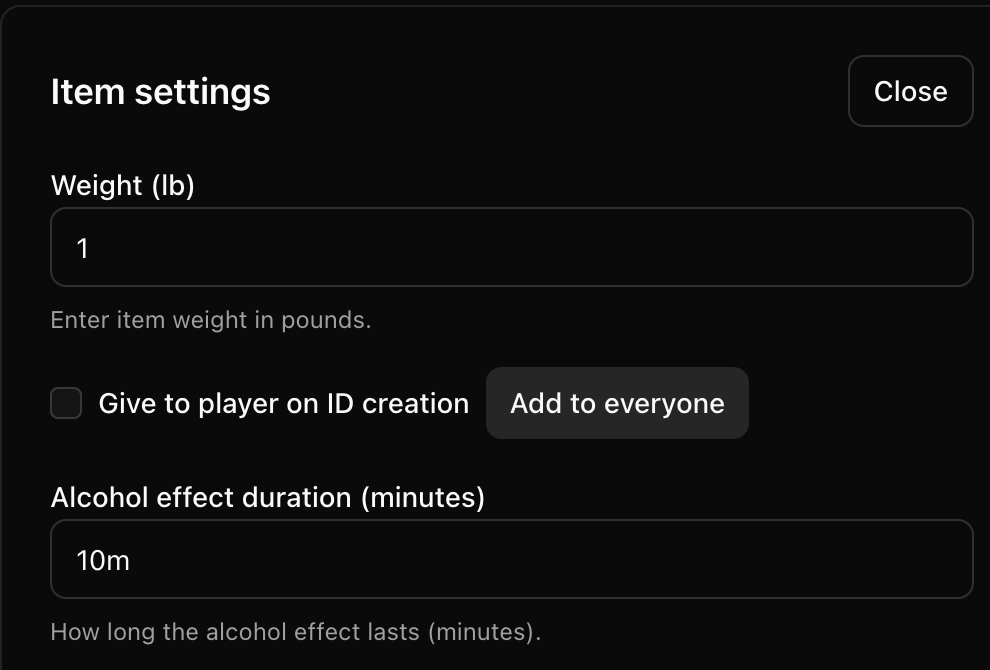
Duration values must be a whole number followed by s, m, h, or d, such as 30s, 10m, 2h, or 1d.
The available categories are Money, Phone, Clothes, Other, Bomb, Weapon, Alcohol, Medkit, Drugs, Bomb defuse, Documents, Water, Food, Paper, and Lighter.
These categories add an extra setting:
- Clothes: Cooldown for Roblox refresh (seconds)
- Bomb: Cooldown to bomb explosion (seconds)
- Alcohol: Alcohol effect duration (minutes)
- Medkit: Cooldown for police (seconds) and Cooldown for players (seconds)
- Drugs: Drug effect duration (minutes)
- Bomb defuse: Bomb defuse duration (seconds)
All other categories use only the common item settings. Changing a category and saving removes settings that do not apply to the new category.
- Select Close, then select the module-level Save button. Wait for Settings saved.
The Add to everyone action is a separate bulk workflow. Follow Give an item to every citizen before using it.
Use the item in Discord
After saving the item, use the dedicated guides for the task you want to complete:
- View inventory and item details
- Give or discard an item
- Use clothing, medical, drug, and alcohol items
- Use paper and lighter items
- Use and defuse explosives
- Create and manage item storage
- Manage citizen items as an administrator
Check the saved item
- Refresh the Items page.
- Confirm that the new item and its category still appear.
- Reopen the item's Settings and confirm that its weight and category-specific value remain saved. For
Alcohol Item, this example uses1 lband10m.
Troubleshooting
- For duration fields, enter a whole number with an
s,m,h, ordsuffix, then select the module-level Save button. - If Add item is unavailable, the server has reached the limit of 100 configured items. Removing an item takes effect when you select the module-level Save button.
Next steps
Continue with Give an item to every citizen.