Give an item to every citizen
Give one configured inventory item to every eligible active citizen, then check the result in Discord.
Before you begin
- Create and save the item before distributing it.
- You need owner or administrator access to your Discord server in the CoreRP dashboard.
- For an observable result, your Discord server needs at least one member with an active citizen ID.
This action gives the item immediately to every eligible citizen. Review the item name before confirming. There is no bulk undo; removing it later is a separate action for each citizen. The bulk action does not check inventory weight or capacity.
Give the item to existing citizens
-
Open the CoreRP dashboard and select your Discord server.
-
Open Module settings, then select Items.
-
Confirm that the item is configured and saved. Open its gear-shaped Settings button.
-
Select Add to everyone.
-
In the Add item to everyone confirmation, review the item name, then select Add to everyone again.
-
Wait for the confirmation showing how many citizens received the item.
CoreRP adds the item to each active citizen ID's default personal inventory only when that inventory does not already contain the exact item name. Existing owners are skipped rather than receiving another copy. Inactive characters and ordinary Discord members without an active citizen ID are not recipients.
- Decide whether future citizen IDs should also receive the item. After a successful bulk action, Give to player on ID creation is enabled locally:
- To include future IDs, leave it enabled, select Close, then select the module-level Save button.
- To limit the item to existing citizens, clear it before saving, or reload the page without saving.

The module-level Save button stores the future-ID setting. The bulk distribution itself happens when you confirm Add to everyone.
Check the result in Discord
- Activate an eligible citizen who did not already own the item, then run
/inventory. The command has no options and its response is visible only to the person who ran it. - Confirm that the inventory shows
1x Bottled Water.
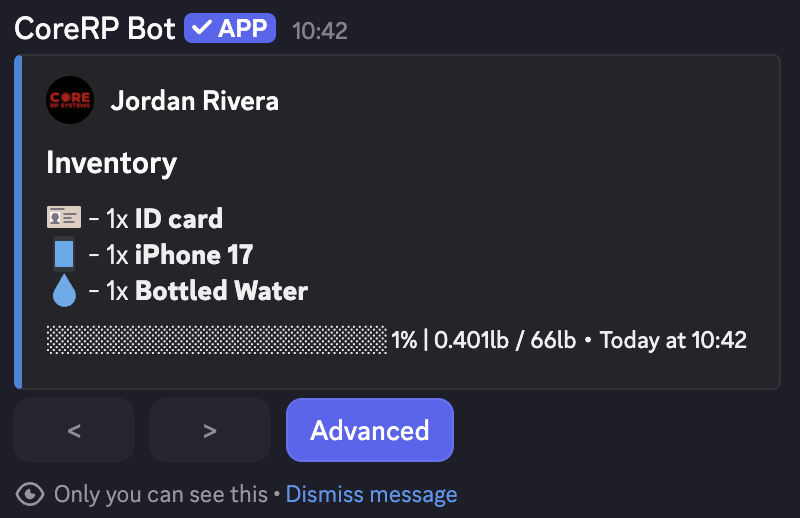
This confirms that the selected citizen received the item. Use the success message's returned count as the result of the full bulk operation.
Troubleshooting
- If CoreRP says the item was already owned by everyone, confirm that your Discord server has active citizen IDs. Citizens who already own the exact item name are intentionally skipped.
- To remove an item from a specific citizen, follow Manage citizen items and money with administrator commands.
Next steps
Continue with View your inventory and item details.