Manage citizen items and money with administrator commands
Add or remove inventory items and main-account money from a citizen's active CoreRP character.
Before you begin
- Discord Manage Messages makes
/adminavailable by default. You also need the server's exact CoreRP Moderator role and access to/adminin the current channel. - The target needs an active citizen. Money commands also require a main bank account.
- Create items in Create and configure inventory items, and set the currency in Configure the CoreRP economy and bank.
- If the server uses Core log, CoreRP needs View Channel, Send Messages, and Embed Links there.
These commands change citizen data immediately. Confirm the target, item, quantity, and amount before sending them.
Add or remove an item
/admin item add target:<member> item:<item> count:[integer]
/admin item remove target:<member> item:<item> count:[integer]
targetis required and selects the member whose active character changes.itemis required. Add suggests configured items and accepts a custom name through Use value. Remove lists the selected target's current items, so choosetargetfirst.countis optional, defaults to1, and must be at least1. Add reduces values above100to100; Remove cannot exceed the quantity held.
-
Enter the add or remove command, then choose
targetanditem. Addcountwhen changing more than one. -
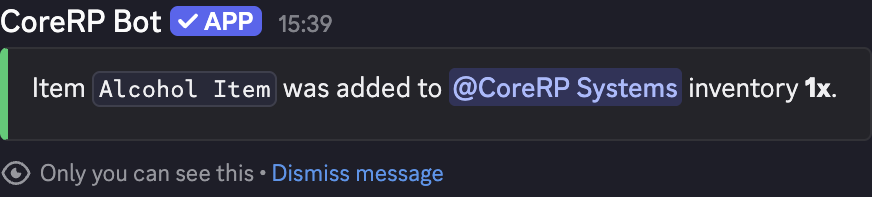
Send the command. CoreRP privately confirms the item, target, and changed quantity. If Core log is configured, it also records the change there.
-
Ask the target to check their inventory.
Leave enough inventory space for the added item. Prefer a configured autocomplete choice.
Add or remove money
/admin money add target:<member> amount:<number>
/admin money remove target:<member> amount:<number>
targetis required and selects the active character's main account.amountis required, must be at least0.01, and is rounded to two decimal places.- Remove requires enough money in the main account.
- CoreRP displays the configured Economy currency without converting the entered amount.
-
Enter the add or remove command, choose
target, and enteramount. -
Send the command. The public result shows the amount, new balance, and administrator.
-
The target can confirm the change with View your balance and pay another citizen. CoreRP also attempts to direct-message the target and write a Core log entry.
Troubleshooting
/adminis unavailable — confirm Discord Manage Messages and the server's command permissions.- You do not have permission to use this command! — assign the exact configured CoreRP Moderator role.
- A disabled, channel-access, or cooldown response — enable
/admin, use an allowed channel, or wait for the displayed cooldown before retrying. - The target user does not have a citizen ID created. — ask the target to select a character. For money, also confirm it has a main bank account.
- Weight limit exceeded or insufficient item quantity — lower
countand compare the selected item with the target's inventory. - The user does not have enough money. — lower the removal amount or check the main-account balance.
Next steps
Continue with Update a citizen's identity fields or add and remove citizen vehicles.