Update a citizen's identity fields
Use /admin change to update the name, surname, or Roblox name on a member's active CoreRP character.
Before you begin
- Complete CoreRP setup.
- Discord Manage Messages controls whether
/adminis available by default. CoreRP separately requires the configured Moderator role. - The server's
/adminenabled, channel or role access, and cooldown rules must allow the command. - The target needs an active citizen ID. This command changes only the active character.
- If the server uses a Core log channel, CoreRP needs View Channel, Send Messages, and Embed Links there.
To edit Birthdate or an inactive character, use Users data. Birthdate is not an
/admin changechoice.
Choose the field and value
All three options are required:
/admin change change_field:<Name|Surname|Roblox name> user:<member> value:<new value>
change_fieldhas exactly three choices:- Name trims surrounding spaces, capitalizes the first character, and makes the remaining characters lowercase.
- Surname uses the same normalization as Name.
- Roblox name trims surrounding spaces but preserves capitalization.
userselects the member whose active character will change.valueis the replacement text. A value containing only spaces is rejected.
- Enter
/admin changeand select Name, Surname, or Roblox name underchange_field.
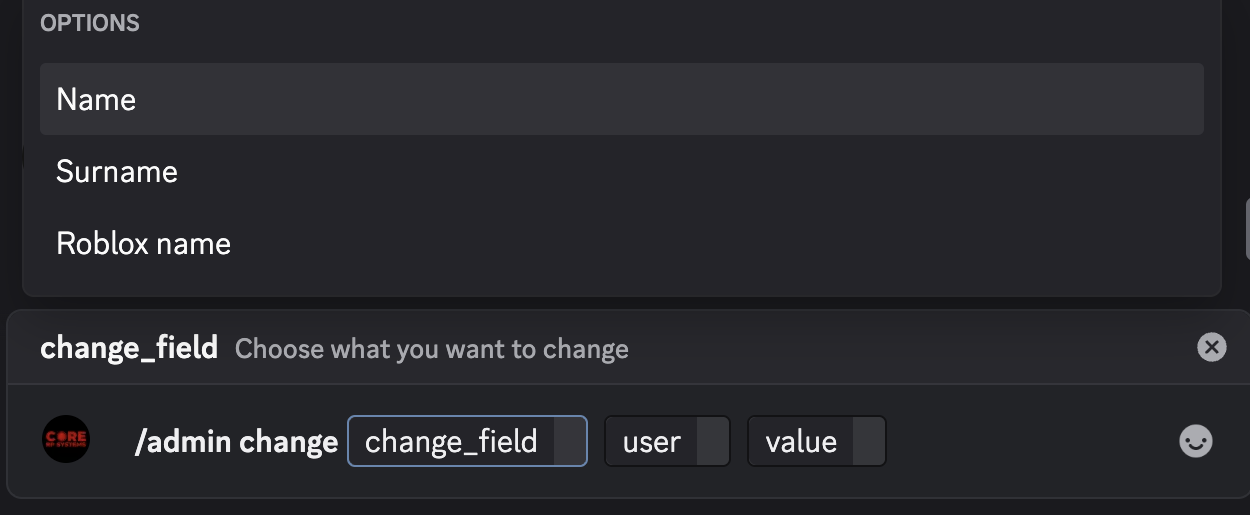
- Select
user, entervalue, and send the command. The identity field changes immediately. - Confirm the public response. It identifies the member and shows Changed field, New value, Nickname updated, and Administrator.
CoreRP does not direct-message the target. It also attempts to record the change in the Core log channel.
Understand the nickname result
CoreRP formats the nickname as Name Surname | Roblox name and shortens it when needed to fit Discord's 32-character nickname limit.
For Nickname updated to show Yes, CoreRP needs Manage Nicknames, and its bot role must be above the target's highest role. Discord does not allow CoreRP to rename the server owner.
Troubleshooting
- If
/adminis unavailable, confirm Manage Messages and Discord's command permissions. - You do not have permission to use this command! — assign the configured Moderator role.
- You do not have permission to use this here., This command is currently disabled., or a cooldown message — use an allowed channel or role, enable
/admin, or wait. - The selected user does not have an active identity. — ask the member to create an ID or switch to the character that should change.
- The new value cannot be empty. or The selected field is not valid. — enter a non-space value and select one of the three displayed choices.
Next steps
Continue with Warn members and manage warnings.