Create and switch between multiple characters
Create another CoreRP character, then choose which character is active when you use the bot.
Before you begin
- Create your first CoreRP character and ID card.
- Your server must allow
2or3ID cards per member. Administrators configure this limit and the optional Multicharacter role in ID card settings. - If the server uses a Multicharacter role, you need it to create another character. You do not need it to switch between characters you already have.
This workflow uses the ID-card panel, not a slash command. The free CoreRP bot also has a separate limit of
25ID cards across the server.
Create another character
- Open the CoreRP ID-card panel. If you recently created or switched a character, wait for the shared creation-and-switch cooldown.
- Select Create your ID card.
- Enter First name, Last name, and Birthdate (DD/MM/YYYY). If Roblox Nick appears, enter the character's Roblox nickname; servers that require Roblox verification hide this field.
- Select Submit.
- If CoreRP shows Roblox verification required, select Verify Roblox account, complete the website flow, return to Discord, and select Refresh verification.
CoreRP creates the character with a separate account and inventory and makes it active.
To use generated identity data instead:
- Select Generate random data, then Male or Female.
- Review the generated name and birthdate. Select Try again for another result, or select Edit data, change the three identity fields, and select Submit.
- Select Accept data.
- If verification is disabled, enter the nickname under Enter Roblox nickname and select Submit. If verification is required, complete Verify Roblox account and then select Refresh verification in Discord.
Switch characters
- Wait for the shared cooldown, return to the ID-card panel, and select Switch ID.
- Open Select ID to activate. Each option shows the character's name, creation date, Roblox nickname, and
(active)beside the current character. - Select a character that is not marked
(active).
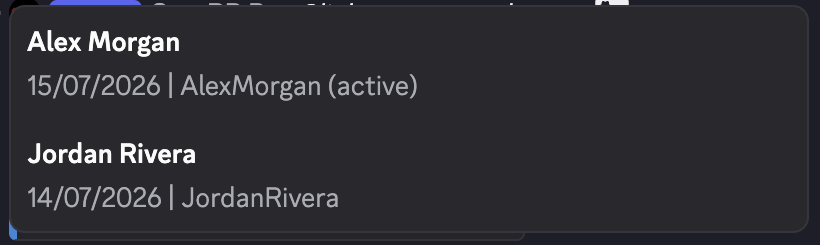
CoreRP confirms the active character and attempts to update your Discord nickname. Balances, inventory, vehicles, and other records stay separate, and later CoreRP actions use the selected character.
Troubleshooting
- If you cannot create another character, wait for the cooldown, check the per-member limit, and ask whether the Multicharacter role is required. Creation also stops when the free bot reaches
25server-wide ID cards. - If Switch ID is missing, the server may allow only one character. After an administrator raises the limit, they can refresh the panel with
/admin panel panel:ID Creation channel:[channel]. - If the character changes but the Discord nickname does not, the selection still succeeded. CoreRP needs Manage Nicknames, its bot role above your highest role, and a target who is not the server owner.
- If verification remains pending, complete the website flow and use Refresh verification after the displayed wait. If the session expired, restart from Create your ID card and resubmit the form.
Next steps
Continue with View your balance and pay another citizen while the intended character is active.