View your balance and pay another citizen
Check your active character's accounts, then pay another citizen with /bank pay.
Before you begin
- Complete CoreRP setup, then create and select the CoreRP character that will send the payment.
- Your active character needs a main bank account. The recipient's account must belong to the same Discord server.
- Use
/bankin a channel and role allowed by the server. - The account label depends on the server's economy and bank settings. USA - California uses Account number; some countries use IBAN.
- To pay from Secondary account, first create a second bank account. Otherwise, keep the default Main account.
View your accounts
- Run
/bank account. - CoreRP privately shows the active character's main account and, when present, secondary account with each identifier and two-decimal balance.
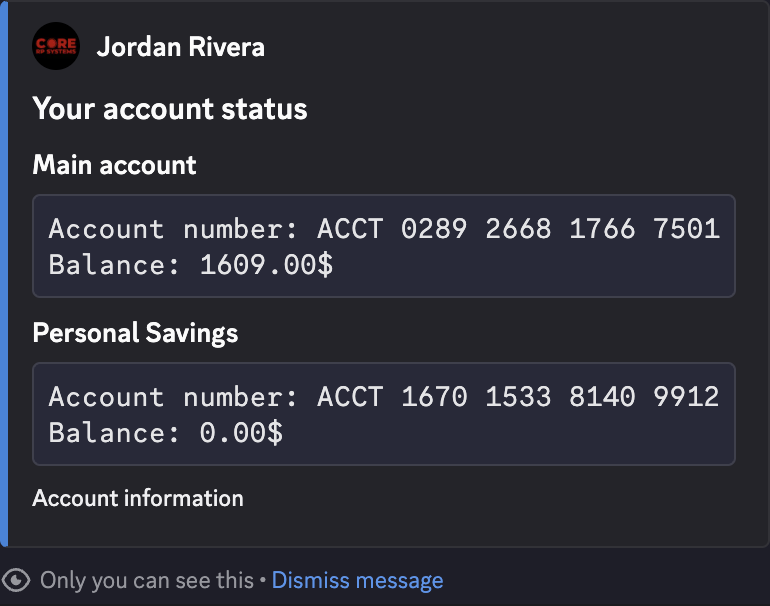
Copy the recipient's account number or IBAN from their own account summary.
Make a payment
/bank paysends the money immediately without a confirmation screen. Check the recipient, source account, amount, and note before sending it.
/bank pay accountid:<target account number> amount:<number> note:[text] account:[Main account|Secondary account]
accountidis the recipient's account number. On servers that use IBAN, the option can appear asiban.amountmust be at least0.01and is rounded to two decimal places.noteis optional and can appear in the configured Bank notifications thread, so do not include private information.accountis optional and defaults to Main account.
You can also transfer between your active character's own Main account and Secondary account. Select one as account and use the other account's identifier as accountid. CoreRP rejects a payment when the selected source and target are the exact same account.
When the Bank notifications thread is configured, anyone who can read it can see the recipient, amount, sender account, note, and destination account. Use /bank account to view your current balance.
Notes beginning with uppercase FINE are reserved for paying a CoreRP fine to the configured system-bank account.
- With Jordan Rivera active, enter
/bank pay, supply Alex Morgan'saccountid, and setamountto125. - Add
notewhen useful and selectaccountonly when you do not want the default Main account. - Send the command. CoreRP privately confirms the rounded amount and source account. The recipient receives the full amount with no transfer fee.
- Both participants can run
/bank accountto see their updated balances.
Troubleshooting
- You do not have a citizen ID. — create or select the character that should make the payment.
- You do not have a bank account. — confirm that the active character has its main account.
- You do not have a secondary account. — select Main account or create the second account linked above.
- Amount must be greater than 0. — enter at least
0.01. - You do not have enough money to pay. — lower the amount or use an account with sufficient balance.
- Target IBAN is not valid. — copy the recipient's current account number or IBAN from
/bank account. - You cannot send a payment from an account to the same account. — use a different recipient identifier.
- Fine with this ID was not found or has already been paid. — check the uppercase
FINEreference and fine status, then verify both balances before another attempt. - A cooldown response — wait for the displayed cooldown before retrying.
- Server setup required, This command is currently disabled., or You do not have permission to use this here. — finish setup, enable
/bank, or use an allowed channel or role.
Next steps
Continue with Create a second bank account.