Create your first CoreRP character and ID card
Create the character CoreRP will use for your balance, inventory, vehicles, and other roleplay features.
Before you begin
- Server staff must have completed CoreRP setup and configured ID cards.
- You must be able to use the server's ID-card creation channel.
- A character under 18 requires the server's configured Child role. Your first character does not require the multicharacter role.
Registration starts from the CoreRP panel, not a slash command.
Create your character
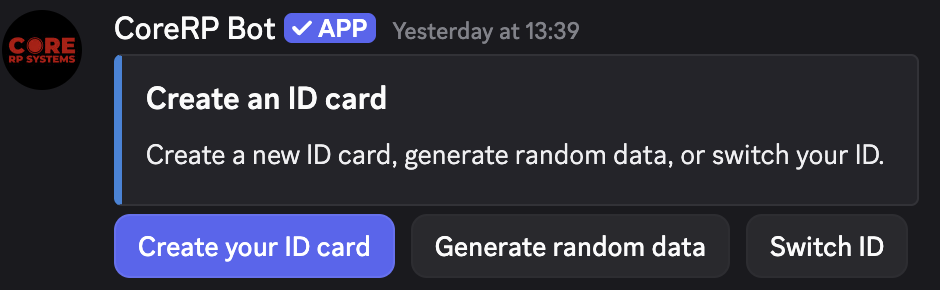
- Open the ID-card creation channel and find the Create an ID card panel.
-
Select Create your ID card and complete the required Registration form:
- First name and Last name: your character's roleplay name.
- Birthdate (DD/MM/YYYY): a date from 1946 through the current year. Accepted separators are
/,-,., and,. - Roblox Nick: your Roblox username. This field is hidden when Roblox verification is required.
-
Select Submit. If Roblox verification required appears, select Verify Roblox account, finish on the website, then select Refresh verification in Discord.
The character is created immediately and becomes active. It receives a primary bank account, inventory, the configured initial balance, and any starting items configured by the server. CoreRP also tries to update your Discord nickname.
The private result says Your ID card has been successfully created. and shows your character name, Roblox Nick, Birthdate, account number or IBAN, and Initial balance.
The initial balance and currency are server-specific.
Generate character details
Select Generate random data, then Male or Female. CoreRP generates a name and birthdate for an 18-to-30-year-old character. Choose:
- Try again for another result.
- Edit data to change the first name, last name, or birthdate.
- Accept data to continue.
After Accept data, either submit the Enter Roblox nickname form or, when required, complete Verify Roblox account and select Refresh verification.
Troubleshooting
- Invalid birthdate — use
DD/MM/YYYY,DD-MM-YYYY,DD.MM.YYYY, orDD,MM,YYYYwithin the accepted year range. - Under-18 role error — ask staff for the configured Child role or use an adult birthdate.
- Maximum IDs, multicharacter role, or server plan-limit error — the server can allow up to three IDs per member; ask staff or follow the guide below.
- Cooldown — wait the displayed creation-and-switch cooldown.
- You do not have permission to use this here — use the configured channel and any required role.
- Verification pending — finish on the website. Refreshes have a 30-second wait; use Refresh verification again afterward.
- Verification expired — sessions expire after 15 minutes; restart from the panel and submit again.
- Nickname unchanged — ask staff to check CoreRP's Manage Nicknames permission and role position.
- Registration error or missing character — ask an administrator before resubmitting.
Next steps
Continue with create and switch between multiple characters when the server allows more than one ID per member.