Issue fines and punishments
Create a fine or a Warning, Probation, or Jail record for a citizen.
Before you begin
- An administrator must use Manage perms in Emergency Services & Phone to grant you either Police commands or City Police commands. Selecting an alert role alone does not grant command access.
- The target member needs an active CoreRP citizen.
/policeand the selected subcommand must be enabled. Use them in the configured channel.
Both commands save immediately without a preview or confirmation. Confirm the target, amount or length, and reason before sending.
When optional ER:LC access is enabled,
/police finemay require the officer and target to use linked Roblox accounts, be online in the connected private server, and remain within80studs./police punishmay separately require the officer to be online in that private server.
Issue a fine
Run:
/police fine target:<member> amount:<whole number> reason:<text>
target,amount, andreasonare required.amountmust be at least1.
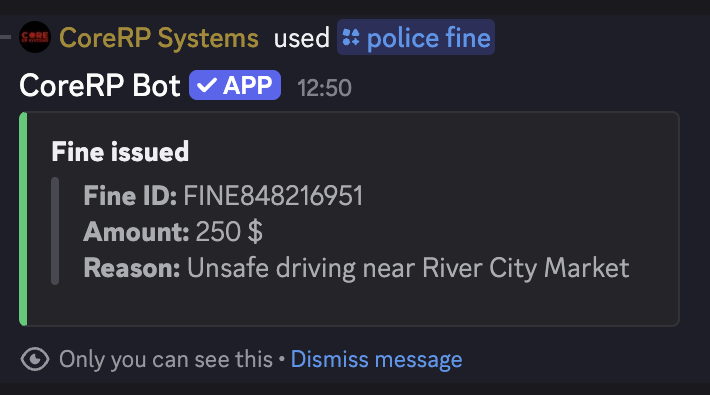
For example, issue Alex Morgan a 250-unit fine for Unsafe driving near River City Market.
CoreRP privately returns the new fine ID, amount, and reason. It saves the fine as unpaid and attempts to send the target a direct message with payment instructions. Issuing the fine does not debit the target's balance.
Issue a punishment
Run:
/police punish target:<member> punishment:<choice> length:<days> reason:<text>
punishment offers exactly:
- Warning
- Probation
- Jail
All options are required. length is a whole number representing the intended number of days.
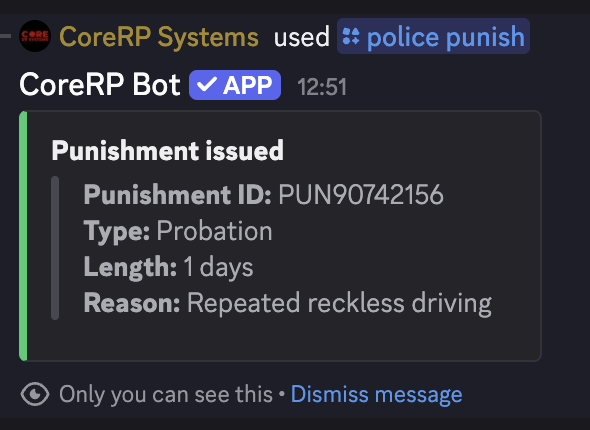
Use concise factual reasons. For example: Failure to follow a lawful traffic-stop instruction for Warning, Repeated reckless driving for Probation, or Evading police after a traffic stop for Jail.
The punishment creates a police record. Use the separate jail-cell workflow when an ER:LC cell must be locked.
CoreRP includes the generated record ID in the result. Use /police record id:<record-ID> whenever you need to review the target, officer, reason, date, status, and fine or punishment details. If CoreRP warns that the direct message could not be delivered, tell the target directly.
Troubleshooting
- A police-permission response — confirm Police commands or City Police commands was granted through Manage perms, not only the configured alert role.
- A cooldown response — wait for the displayed cooldown before retrying.
- member does not have a citizen ID. — ask the target to activate the intended character.
- A fine proximity response — join with both linked Roblox accounts and move within
80studs when that optional rule is enabled. - A punishment in-game response — join the connected private server with the officer's linked Roblox account when that optional rule is enabled.
Next steps
Continue with review and manage criminal records.