Add and remove vehicles with administrator commands
Use /admin garage to add an unregistered vehicle to a member or remove one by its plate or generated ID.
Before you begin
- Complete CoreRP setup.
- Discord Manage Messages is the default permission for
/admin. You also need the configured CoreRP Moderator role. - The server's
/adminenabled, channel or role access, and cooldown rules must allow the command. - The target member needs an active citizen ID.
- If the server uses a Core log channel, CoreRP needs View Channel, Send Messages, and Embed Links there.
For a member with multiple characters, confirm the intended active character before changing vehicles. Confiscated vehicles are hidden from these commands.
Add a vehicle
/admin garage add user:<member> vehicle:<text> color:[text]
user and the free-text model name in vehicle are required. color is optional and displays as Unknown when omitted.
-
Run
/admin garage add, selectuser, entervehicle, and optionally entercolor. -
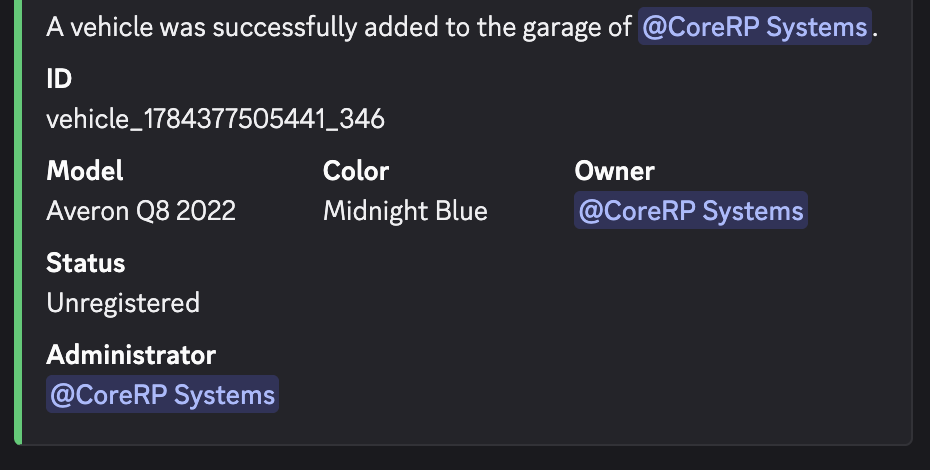
Confirm the public result. It shows ID, Model, Color, Owner, Status, and Administrator. The new vehicle has no plate and is Unregistered.
-
Copy the generated ID. You need it to remove an unregistered vehicle with no plate.
Remove a vehicle
/admin garage remove user:<member> plate:<plate-or-ID>
Both options are required. user selects the owner. plate accepts an exact plate or generated ID without case sensitivity; it has no autocomplete.
-
Run
/admin garage remove, selectuser, and enter the plate or ID inplate. -
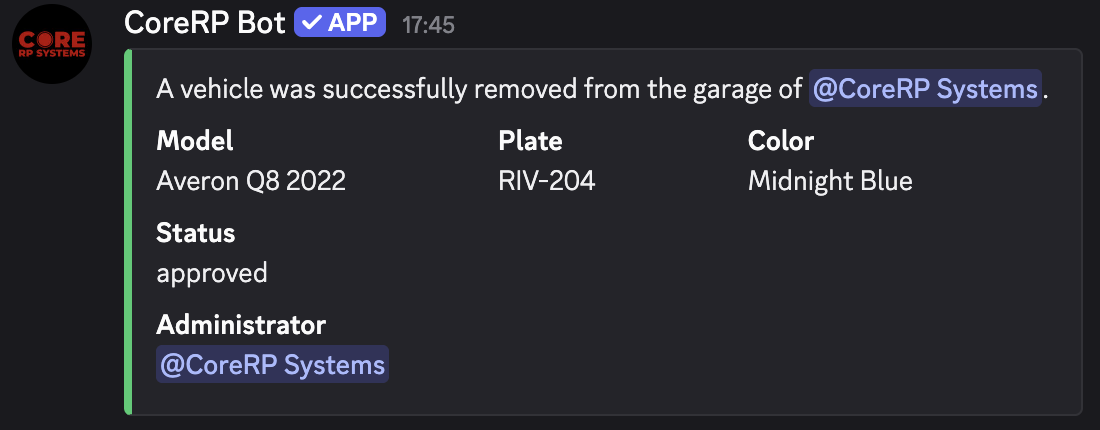
Confirm the public result. It shows Model, Plate, Color, Status, and Administrator.
-
Ask the member to run
/garage showand confirm the vehicle is gone.
After either success, CoreRP also sends the result to the member by direct message and tries to add a Core log entry.
Troubleshooting
/adminis unavailable — confirm Manage Messages and the server's Discord command permissions.- You do not have permission to use this command! — assign the configured Moderator role.
- You do not have permission to use this here., This command is currently disabled., or a cooldown message — use an allowed channel or role, enable
/admin, or wait. - The target user does not have a citizen ID created. — ask the member to create or select the intended character.
- @member has no vehicles in the garage or has no citizen ID created. — confirm the active character and its visible garage.
- Vehicle with plate/ID ... was not found in the garage of @member. — check the exact plate or generated ID. Confiscated vehicles are unavailable.
Next steps
Continue with Register or edit a vehicle.