Register or edit a vehicle
Submit a new vehicle registration or request changes to an approved registration from the public CoreRP panel.
Before you begin
- Create and select the CoreRP character that owns the vehicle.
- An administrator must publish the Vehicle registration panel, configure an ID/Vehicle confirmation channel that CoreRP can use, and restrict that channel to trusted reviewers.
- CoreRP setup and the vehicle workflow must remain enabled. Any required vehicle-workflow channel and role apply throughout the panel workflow. These interactions do not use a configured slash-command cooldown.
- New registration requires a vehicle listed under Unregistered vehicles and is free.
- Editing requires a vehicle listed under Registered vehicles and at least
1,500units in the active character's primary account.
Submitting an edit charges the displayed edit fee. Review every field before submitting.
Register a vehicle
-
Open the public Vehicle registration panel and select Register vehicle.
-
In Select a vehicle to register, choose Averon Q8 2022.
-
Complete every field in Vehicle registration:
- License plate — enter a unique plate without underscores, such as
RIV-204. - Register to (First Last) — enter
Jordan Rivera. - Vehicle color — enter
Midnight Blue.
- License plate — enter a unique plate without underscores, such as
-
Submit the form.
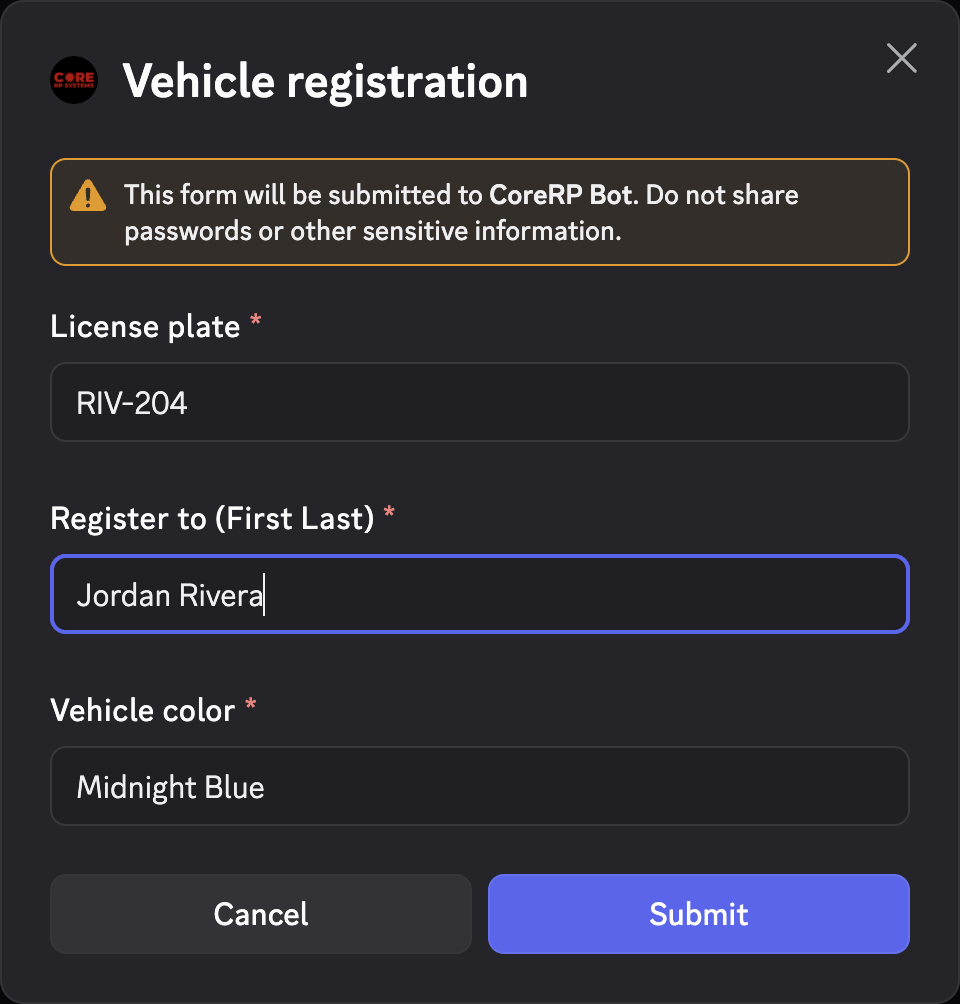
CoreRP privately confirms Vehicle registration request sent for approval, changes the vehicle to pending, and posts a public review card in the configured confirmation channel. Register to is display text only; it does not transfer the vehicle.
Edit an approved registration
- Return to the panel and select Edit registration.
- In Select a vehicle to edit registration, choose the approved Averon Q8 2022.
- Review the displayed
1,500fee. - Update the required License plate, Register to (First Last), or Vehicle color fields. The model cannot be changed.
- Submit the form.
The vehicle remains pending until a reviewer decides the request. An approved edit keeps the proposed values; a declined edit restores the earlier plate, owner text, and color.
See the request status
- Run
/garage showand confirm the vehicle appears under Pending approval. - Ask a trusted reviewer with confirmation-channel access to confirm the matching request card.
- For an edit, confirm the primary balance decreased by exactly
1,500units.
Troubleshooting
- No vehicle appears in the selector — confirm it belongs to the active character and appears under Unregistered vehicles for registration or Registered vehicles for editing.
- A setup, disabled-workflow, or access response from an opened panel — confirm CoreRP setup, the vehicle workflow's enabled state, and any saved required channel and role, then reopen the current panel.
- A duplicate-plate response — enter another server-wide unique plate.
- You do not have enough money to edit the registration — add funds to the active character's primary account before reopening the edit flow.
- Admin channel was not found — ask an administrator to configure the confirmation channel and CoreRP's access there.
Next steps
Continue with approve or decline a vehicle registration.