Use clothing, medical, drug, and alcohol items
Use a configured Clothes, Medkit, Drugs, or Alcohol item and confirm its result.
Before you begin
- View the active character's inventory and confirm it contains the item you want to use.
- An administrator must configure the item as Clothes, Medkit, Drugs, or Alcohol. The examples below use Work Jacket, First Aid Kit, Drug Item, and Alcohol Item.
/item usemust be enabled. Use it in the server's allowed channel and wait for any configured cooldown.- Clothes and Medkit additionally require a connected ER:LC Extension, an online private server, and saved Roblox names for the affected characters.
Drugs, alcohol, and a successfully used Medkit consume one item immediately. Check the active character and selected item before completing the action.
Use an item
Run:
/item use item:<item>
The item option is required. Select one of the active character's positive-quantity inventory items from autocomplete. CoreRP supports these categories:
- Clothes — CoreRP runs an ER:LC clothing refresh for the active character's saved Roblox name and privately returns Clothes should be refreshed. The Work Jacket is not consumed.
- Medkit — CoreRP privately lists up to 25 active citizens whose saved Roblox names are currently online. Select the player to heal. CoreRP then consumes one First Aid Kit, runs the ER:LC heal command, and privately confirms the healed player.
- Drugs — CoreRP consumes one Drug Item, privately confirms it was used, and shows when the effect ends. The default duration is
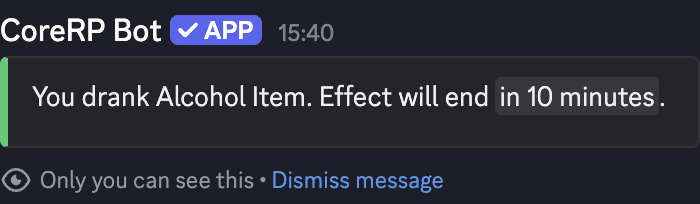
15 minutesunless the item has a configured duration. - Alcohol — CoreRP consumes one Alcohol Item, privately confirms it was used, and shows when the effect ends. The default duration is
10 minutesunless the item has a configured duration.
Clothes also uses the item-specific Cooldown for Roblox refresh, which defaults to
10 seconds.
Troubleshooting
- You do not have an item named ... in your inventory. — select the intended active character and a current positive-quantity autocomplete result.
- A missing Roblox-name response — save the correct Roblox name on the active character. Medkit targets also need an active CoreRP character with a saved Roblox name.
- No players found. — confirm that an eligible saved Roblox account is online in the connected private server.
- For an ER:LC connection message, ask an administrator to check the extension setup.
- You can use this command again in ... after using Clothes — wait for the displayed Cooldown for Roblox refresh.
- The effect success appears but a later police test is clean — confirm that the test targets the same active character and runs before the displayed end time.
- A setup, disabled-command, required-channel, or cooldown response — finish setup, enable
/item, use the required channel, or wait for the configured command cooldown.
Next steps
Continue with write and use paper and lighter items, or learn how police test drug and alcohol effects.