Run sobriety and drug tests
Check a citizen's active Alcohol and Drugs item effects with CoreRP's private police tests.
Before you begin
- You need a grant from Police commands or City Police commands through Manage perms in Emergency Services & Phone. The corresponding alert role alone is not sufficient.
- The target member needs an active CoreRP citizen.
- The
/policecommand and test paths must be enabled. Use them in the configured channel. - A positive result requires an active effect created by using a configured Alcohol or Drugs item.
Run both tests
Use these exact commands:
/police test breathalyzer target:<member>
/police test drug target:<member>
Each command has one required target option and no other options.
- Breathalyzer privately reports No traces of alcohol were detected. or lists every active Alcohol item effect with its remaining time.
- Drug test privately reports no traces or lists every active Drugs item effect with its remaining time.
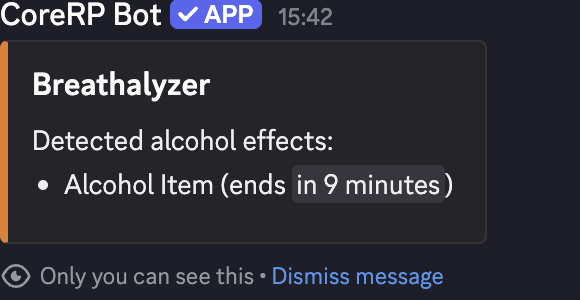
Each result is private and reports the selected member's currently active character. Running a test does not consume an item.
Troubleshooting
- A police-permission response — confirm a Police commands or City Police commands grant rather than only an alert role.
- A cooldown response — wait for the displayed cooldown before retrying.
- The target has no citizen ID — ask them to activate the intended character.
- An expected effect is missing — confirm the target did not switch characters, the item category is exactly Alcohol or Drugs, and the configured effect has not expired.
- A clean result appears unexpectedly — confirm the target's active character, item category, and current effect before retrying.
Next steps
Continue with confiscate a citizen's inventory items.