Create and manage item storage
Create a personal storage, move ordinary items in and out, and share access with another citizen.
Before you begin
- View the active character's inventory and select the character that should own the storage.
- The
/item storagecommands must be enabled. Use them in the server's allowed channel; configured cooldowns apply. - Each active character can create at most two storages through Discord. A storage shared with the character does not count toward that limit.
Sharing grants full view, deposit, and withdrawal access to the target's currently active character. Store ordinary items such as Bottled Water.
Create a storage
Run:
/item storage create type:<Car|House|Warehouse> name:[text]
type is required. name is optional; a blank name appears as Default storage. For this workflow, select Warehouse and enter Riverside Storage Unit.
CoreRP privately confirms Created storage Riverside Storage Unit of type Warehouse.
Add and view items
- Run
/item storage add storage:<storage> item:<item> count:[integer]. - Select one of your accessible storages, then select an ordinary item from the active character's inventory.
countdefaults to1, has a minimum of1, and cannot exceed the available quantity. - CoreRP immediately moves the quantity and privately confirms it was stored.
- Run
/item storage show storage:<storage>to view its contents. Use < and > when it contains more than 10 distinct item names.
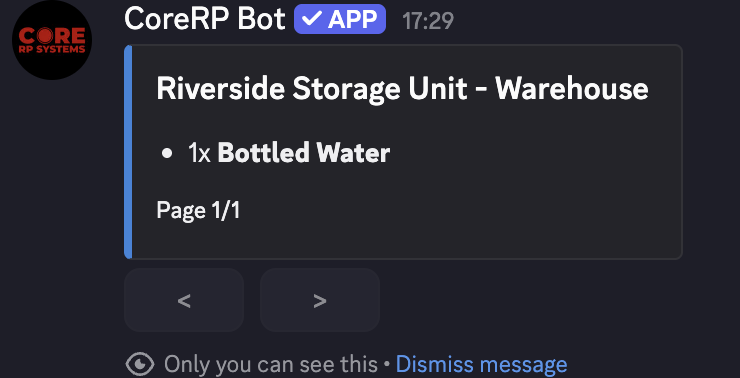
The view combines items with the same name and omits confiscated quantities. An empty storage displays Your storage is empty. Use the controls in the current storage message and remain in an allowed channel.
Share or revoke access
Run:
/item storage permissions storage:<storage> target:<member> action:<Grant|Revoke>
Only the owner can use this command. The target needs an active character when you grant or revoke access. CoreRP applies the change immediately and privately confirms it.
Access belongs to the target's currently active character, not every character on that Discord account.
After revocation, the storage no longer appears among that character's accessible storages.
Remove an item
- Run
/item storage remove storage:<storage> item:<item> count:[integer]. - Select an item from the chosen storage.
countdefaults to1, has a minimum of1, and cannot exceed the available quantity. - CoreRP moves the quantity into your active character's inventory and privately confirms it.
Your personal inventory must have enough capacity for the item. A shared character can remove any available item, not only items they deposited.
Troubleshooting
- You can have at most 2 storages. — use an existing storage. Only administrators can delete a storage through Users data, and deletion also removes every item still inside it.
- Could not create storage. A storage with this name may already exist. — choose another short name.
- Selected storage was not found. — confirm the active character owns or shares the selected storage. Only owners can change permissions.
- Permanent items cannot be moved to storage. — leave the permanent item in ordinary inventory.
- An insufficient-item response — check the correct source inventory and lower
count. - The personal inventory has insufficient capacity — free inventory space before removing the item.
- Storage session expired. Use the command again. — rerun
/item storage showand use the controls on the new response. - A cooldown response appears. Wait for the displayed cooldown before retrying.
Next steps
Learn how to grow plants and prepare materials.