Open, put on break, and close a business
Change an authorized business between Open, Break, and Closed.
Before you begin
- An administrator must first create the business, configure its staff access, and publish its status panel.
- You need an enabled Employee, Owner, or Director permission for the selected business, either directly or through a permission group scoped to that business or all businesses.
- Direct citizen grants and manually assigned citizen group members require the matching character to be active. An Everyone or synchronized Discord-role group can authorize your Discord member without an active character.
- The
/businesscommand and selected action must be enabled. Configured channel restrictions and command cooldowns apply.
If the ER:LC Extension and an action's Only in-game rule are enabled, you also need an active character with a saved Roblox name who is online in the linked private server. This requirement still applies when an Everyone or Discord-role group supplies the business permission.
Choose a status action
All three commands require the business option:
/business open business:<business>— saves Open and publicly responds, for example, Business Downtown Auto Service was successfully opened!/business break business:<business> time:<minutes>— saves Break and publicly responds, for example, Business Downtown Auto Service is on a break for 5 minutes.timeis required and must be a whole number from5through60./business close business:<business>— saves Closed and publicly responds, for example, Business Downtown Auto Service was successfully closed!
Start typing the business name, then select the business from autocomplete.
Change the business status
- Enter the appropriate command and select the saved business from autocomplete.
- For Break, enter a whole-number
timefrom5to60minutes. - Send the command and confirm the public result.
- Confirm that the shared Business Status panel changes to Open, Break, or Closed.
- When configured, CoreRP also sends the matching ER:LC announcement.
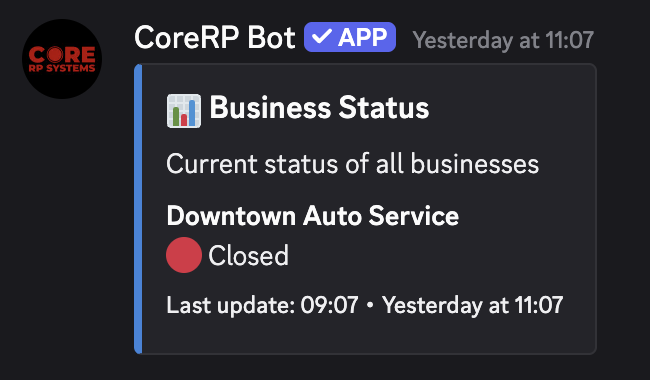
Timed breaks
A timed Break automatically returns the business to Open after the selected duration, and the panel refreshes.
Troubleshooting
- A permission response appears — confirm the saved Employee, Owner, or Director grant, exact business scope, enabled permission group, and active character when the assignment is citizen-based.
- The business cannot be found — select it from autocomplete and ask an administrator to confirm its saved configuration.
- A cooldown response appears. Wait for the displayed cooldown before retrying.
- Discord rejects the Break duration — enter a whole number from
5through60. - You need to be in-game to use this command. — when Only in-game is enabled for that action, select the linked active character and join the configured ER:LC private server.
- A missing, invalid, or offline ER:LC connection blocks an Only in-game check — ask an administrator to restore the extension connection before retrying.
- Server setup required, a disabled-command response, or You do not have permission to use this here. — finish setup, enable the command path, or use its allowed channel.
Next steps
Administrators can use permission groups to grant business access through Everyone, synchronized Discord roles, or selected citizens.