Manage a citizen's inventories and items
Use Users data to correct a citizen's personal inventory, storages, and item rows.
Before you begin
- You need owner or administrator dashboard access.
- Confirm every item and quantity before saving. Changes appear in the citizen's CoreRP inventory.
- Deleting an inventory can also remove the items stored in it.
Manage inventories
- Select the server, open Users data, and choose the citizen.
- Open Inventory.
- Select Add inventory.
- Choose Inventory for the personal inventory or Storage for a separate storage, then enter its label.

- Select Save.
A citizen can have one personal inventory and up to three storages.
Manage items
- Select Add item, or edit an existing item row.
- Choose the destination Inventory.
- Enter the exact Item name and a Count of at least
1. - Enable Permanent when the item must not be given away, discarded, or moved into storage.
- Use Taken away and Ends only when correcting a confiscated item record.
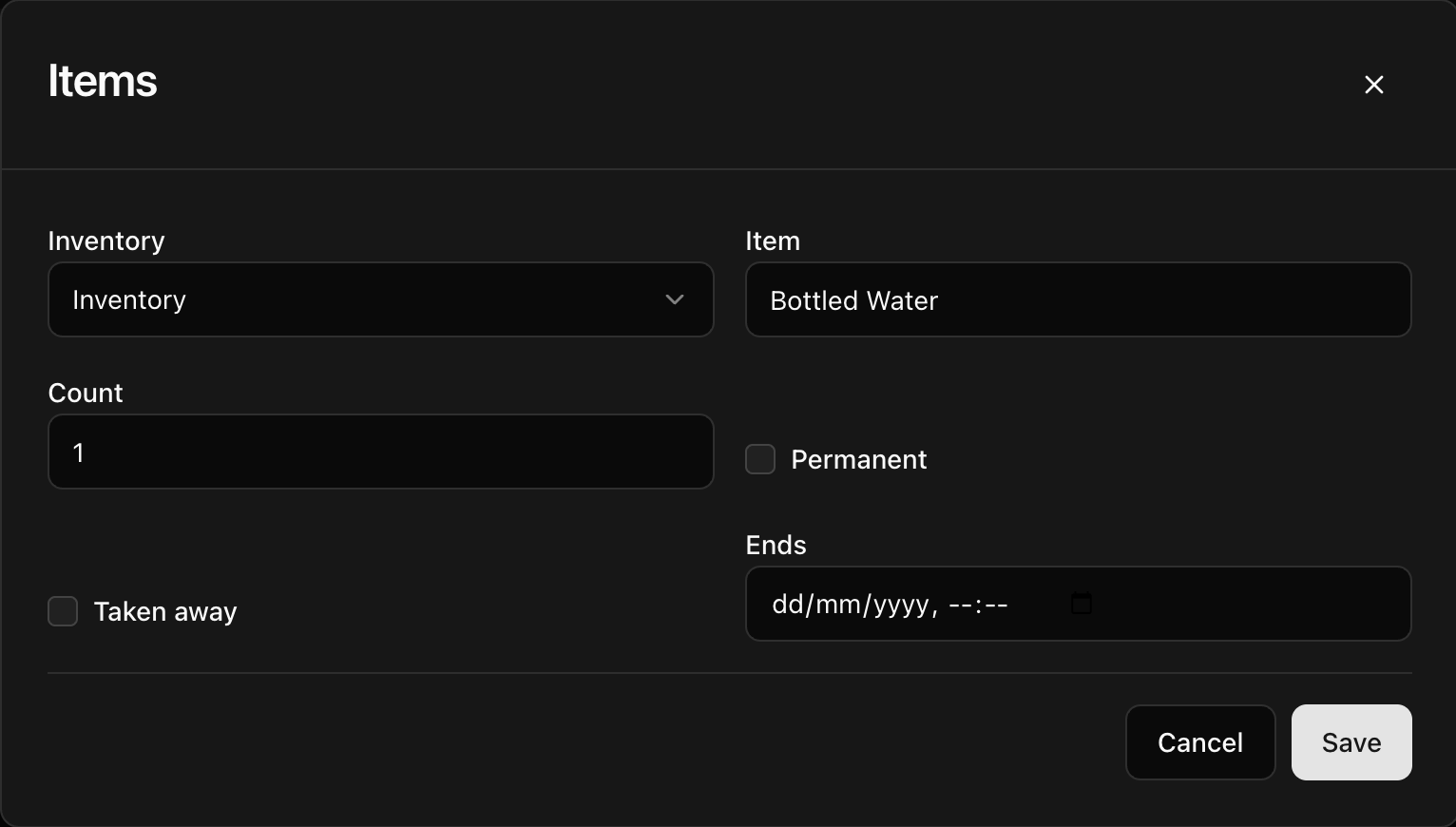
- Select Save. CoreRP confirms User data updated and refreshes the tables.
To remove an inventory or item, select its delete action and confirm Delete this row?
Next steps
Members can review the result with View your inventory and item details.