Open the dashboard and sync server data
Refresh the Discord channels, threads, roles, and emojis available to CoreRP with /admin web, then open the dashboard.
Before you begin
- You need Discord Manage Messages so Discord exposes
/admin, plus any configured/adminchannel, role, and cooldown access. - Unlike most mutating
/admincommands,/admin webdoes not require the configured CoreRP Moderator role. - Your browser account must already be authorized to manage the server in the CoreRP dashboard. Discord permissions alone do not grant dashboard access, and the command does not create it.
- CoreRP must be able to view the server's channels, threads, roles, and emojis.
Sync and open the dashboard
- Run
/admin web. The command has no options. - CoreRP privately returns Web Dashboard with synchronized Channels, Threads, Roles, and Emojis counts and an Open web dashboard link.
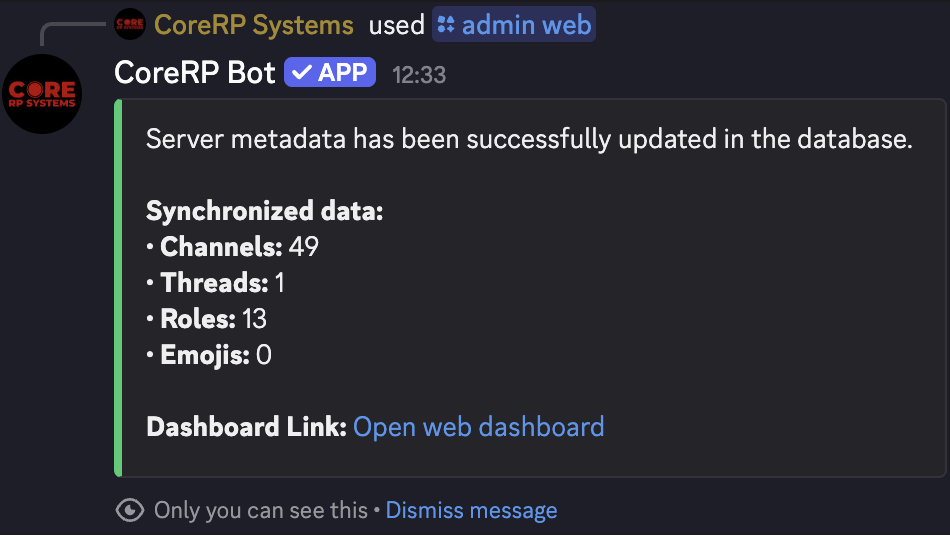
- Select Open web dashboard. The link opens corerp.systems, where you may need to sign in with Discord.
- In the server selector, choose the Discord server you are authorized to manage.
The command refreshes the channel, thread, role, and emoji choices available in the dashboard. It does not create or delete Discord content or grant dashboard access.
Check the dashboard
- Reload the dashboard after the command completes.
- Select the intended server.
- Open a setting that contains a current channel and role selector, and confirm one known current channel and role are available.
Troubleshooting
/admin webis unavailable — confirm Discord Manage Messages and that/adminis enabled for the current channel and role.- A configured cooldown response — wait for the displayed
/admincooldown before retrying. - The server selector does not show the server — reload, select All, clear Search servers..., and confirm that the signed-in browser account already has dashboard access.
- A direct dashboard link says you do not have access —
/admin webcannot grant dashboard access. Ask the server owner or CoreRP support for access.
Next steps
Use Find and copy CoreRP commands for command reference, or continue configuring the selected server in the CoreRP dashboard.