
Submit and vote on server suggestions
Publish a suggestion, vote on ideas, and use the available moderator actions.
Before you begin
- An administrator must configure the Suggestions channel and Moderator role.
- You do not need a CoreRP character, Phone item, or balance.
Submit a suggestion
- Send a normal text message in the configured Suggestions channel. There is no suggestion slash command.
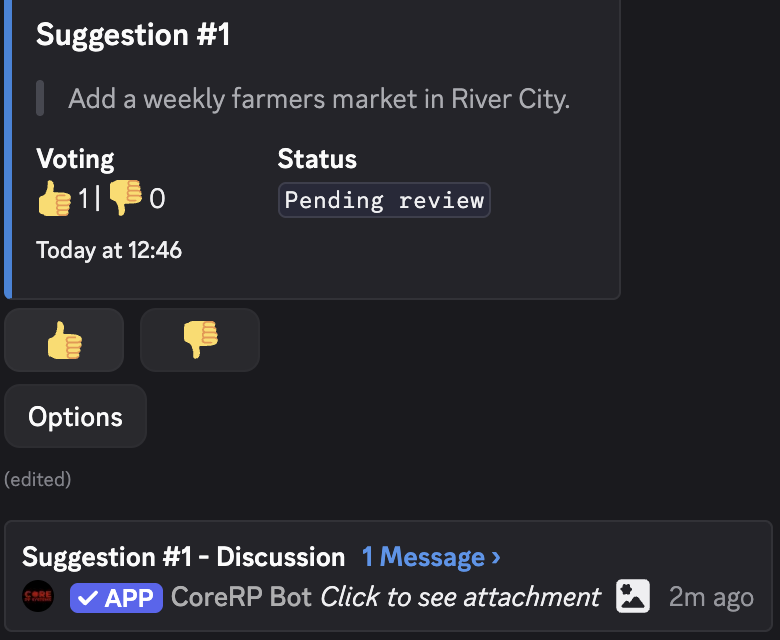
- Confirm that CoreRP replaces it with a public Suggestion #N card.
- Use the Suggestion #N - Discussion thread when CoreRP creates one.
The card identifies the author, quotes the suggestion, and starts with 👍 0, 👎 0, and Pending review. Include text in the message; attachments are not added to the suggestion card.
Vote
Your first vote is permanent for that suggestion. It cannot be changed or removed.
Select 👍 or 👎, then confirm that the matching count increases. Each Discord account can cast one vote per suggestion, including the author.
Moderator actions
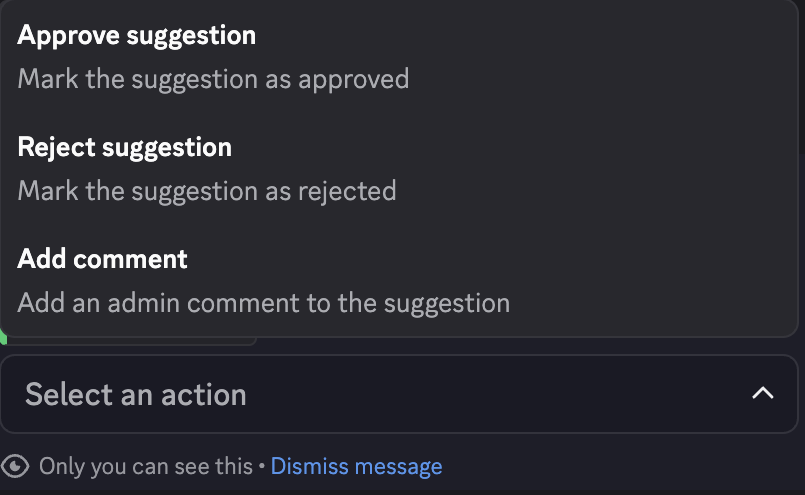
Members with the configured Moderator role can select Options, then choose:
- Approve suggestion — changes the status to
Approvedand disables the card controls. - Reject suggestion — changes the status to
Rejectedand disables the card controls. - Add comment — opens Add a comment to the suggestion. Enter up to
1,000characters in Comment to add an Administrator comment to the card.
Approval and rejection apply immediately. Check the selected suggestion and action first.
Troubleshooting
- Suggestion cannot be empty. — include normal text in the message.
- You have already voted for this suggestion! — your first vote is final.
- You do not have permission to use this button! — the moderation menu requires the configured Moderator role.
Next steps
Continue with Create or delete an anonymous account and send messages.