Configure CoreRP channels and roles
Route CoreRP logs, approvals, suggestions, reputation notices, and psychological tests to the correct Discord channels, then choose the roles CoreRP recognizes as moderators and child characters.
Before you begin
- Complete CoreRP setup.
- You need owner or administrator access to your Discord server in the CoreRP dashboard.
- Create the destination channels and roles in Discord first. All five destination selectors accept only text or announcement channels. If a new or renamed choice is missing from the dashboard, synchronize it with
/admin webas described below. - To use
/admin webor/admin panel, you need Discord's Manage Messages permission and any generic/adminaccess rules configured for the server.
Choose the channels
-
Open the CoreRP dashboard, select your Discord server, then open Module settings → Other.
-
Select each destination from the synchronized text and announcement channels, then give CoreRP the listed Discord permissions:
- Log channel receives CoreRP audit and activity records. Grant View Channel, Send Messages, Embed Links, and Manage Webhooks.
- ID/Vehicle confirmation channel receives a new-ID confirmation card after a member successfully creates an ID. The ID already exists when this card appears; it is not an approval request. The same channel receives vehicle-registration and registration-edit requests for staff approval. Grant View Channel, Send Messages, and Embed Links.
- Suggestions channel turns members' ordinary messages into suggestion cards and creates a discussion thread for each one. Grant View Channel, Send Messages, Embed Links, Manage Messages, Read Message History, Create Public Threads, and Send Messages in Threads.
- Reputation channel receives notices when a member uses
/rep plusor/rep minus. Grant View Channel, Send Messages, and Embed Links. - Psychotest channel contains the public Psychological tests purchase panel. Grant View Channel, Send Messages, Embed Links, and Read Message History so CoreRP can find and refresh the panel.
Choose the roles
-
Under Roles, select Moderator. CoreRP uses this role for staff commands and suggestion moderation. Administrator command paths also require Discord's Manage Messages permission.
/admin weband/admin panelrely on Manage Messages and the server's generic command rules; they do not additionally check the configured Moderator role. -
Select Child role. A member creating a citizen younger than
18must already have this role. CoreRP recognizes the role but does not grant it automatically; citizens aged18or older do not need it. -
Select Save, reload Other, and confirm that all five channels and both roles still show your selections.
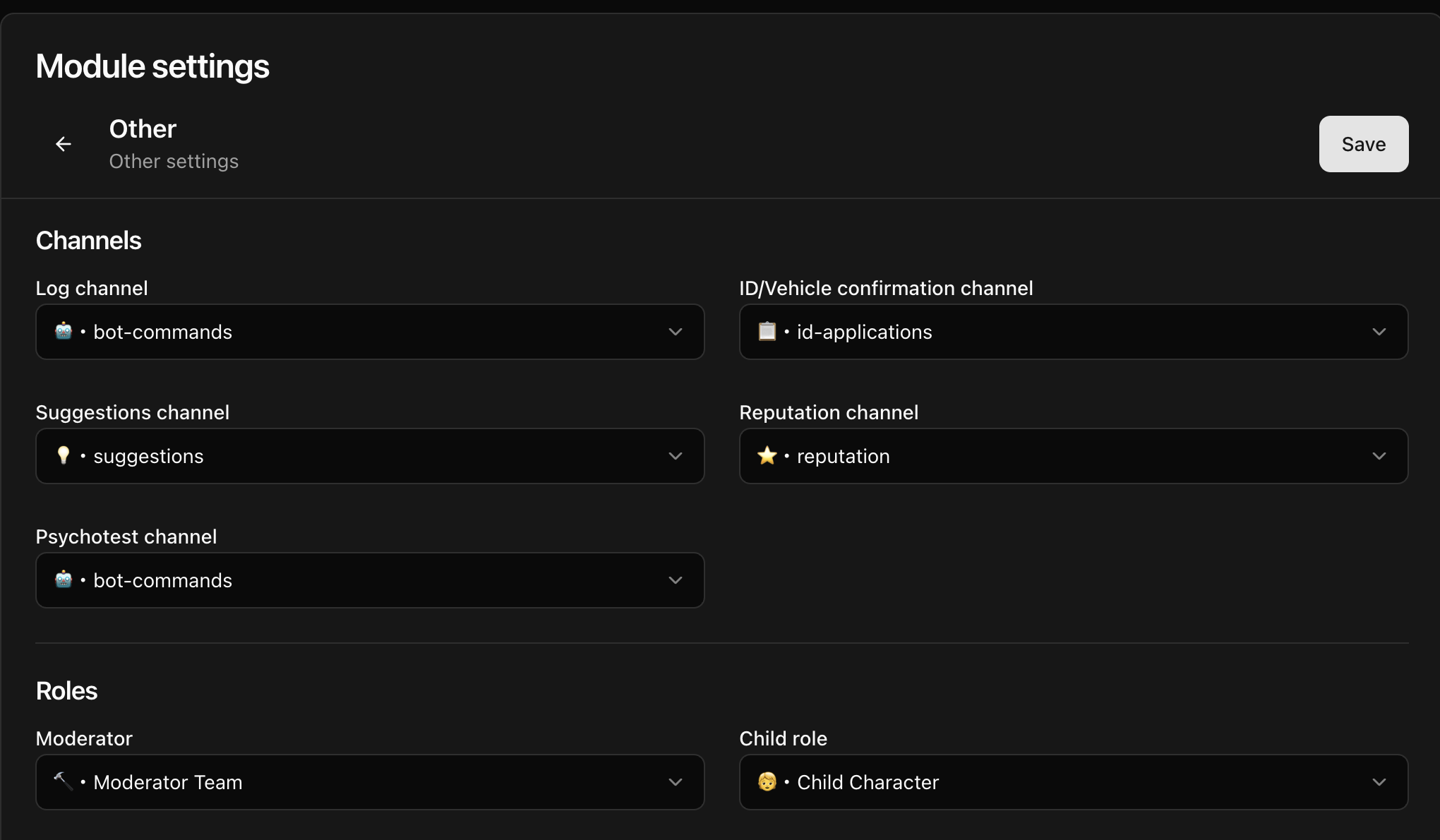
Changing Psychotest channel and saving publishes or refreshes Psychological tests in the selected channel. Changing the confirmation channel does not publish the member-facing ID or vehicle panel; use /admin panel when you need to publish one.
Synchronize missing choices
Run /admin web in Discord. The command has no options and privately confirms the synchronized channel, thread, role, and emoji totals. Reload Other after it finishes.
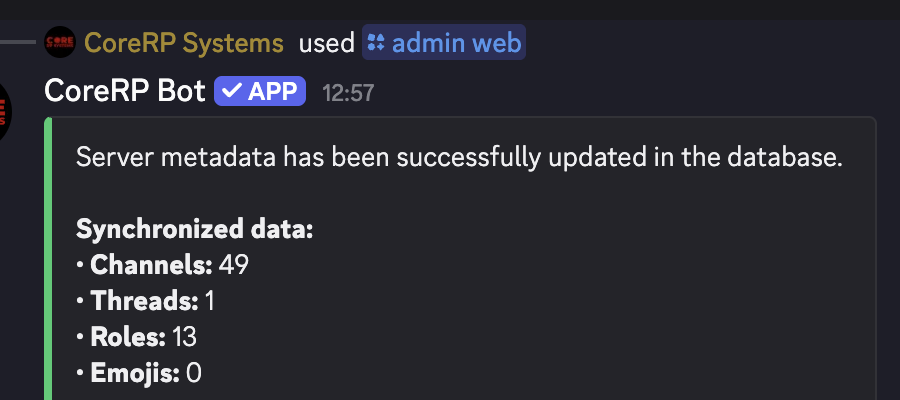
The example contains 49 channels, 1 thread, 13 roles, and 0 emojis; your totals will match your Discord server.
Publish related panels
Use these /admin panel choices when the matching public panel is missing or should be sent to another channel:
/admin panel panel:ID Creation channel:[optional]/admin panel panel:Vehicle registration channel:[optional]/admin panel panel:Psychological Tests channel:[optional]
The panel option is required. The channel option is optional; omit it to publish in the current channel. In the publication channel, CoreRP needs View Channel, Send Messages, and Embed Links. ID Creation and Psychological Tests also require Read Message History.
Use suggestions and reputation
Members post suggestions as ordinary messages in the saved Suggestions channel. Reputation notices from /rep plus and /rep minus go to the saved Reputation channel. Follow the dedicated guides for suggestions and reputation.
Troubleshooting
- If a channel is missing from a selector, confirm that it is a text or announcement channel; voice, forum, and category channels do not appear in these five selectors. Then run
/admin web, wait for the private success response, and reload the dashboard. For a missing role, run the same synchronization and reload steps. - If a panel is missing, confirm the saved destination and CoreRP's permissions, then use the matching complete
/admin panelcommand above. - If suggestions remain as ordinary messages, recheck Suggestions channel and all seven required permissions, especially Manage Messages, Read Message History, and the two thread permissions.
- If
/rep inforeports that the target has no citizen ID, activate that citizen or choose a member with an active citizen before retrying.
Next steps
Continue with customizing CoreRP embed colors, submitting and voting on suggestions, or giving and reviewing reputation.