View your garage and transfer a vehicle
Review the active character's visible vehicles, then transfer one vehicle to another citizen.
Before you begin
- Create and select the CoreRP character that owns the vehicle.
- The recipient must also have an active CoreRP character.
- The
/garagecommand paths, configured required channel, and any configured command cooldown must allow you. - The source vehicle must be visible and not currently confiscated.
A transfer is immediate and the recipient does not confirm it. Confirm both active characters and use a unique plate whenever possible.
View your garage
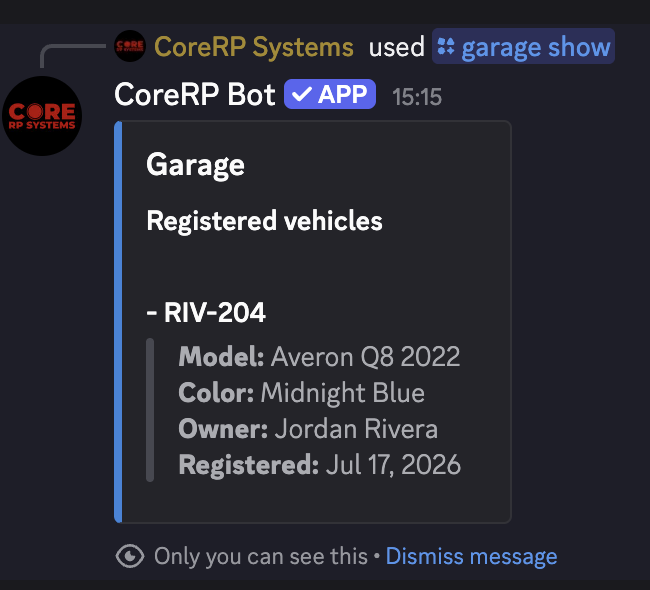
Run /garage show. It has no options.
CoreRP privately groups the active character's visible vehicles into Registered vehicles, Pending approval, and Unregistered vehicles. Depending on status, each row shows its model, color, owner, date, and plate when available.
Transfer a vehicle
Run:
/garage vehicle transfer target:<member> plate:<vehicle>
targetselects the recipient.plateis required and uses autocomplete to show visible source vehicles asplate - model.
- Select the intended recipient. Do not transfer a vehicle to yourself.
- Select Averon Q8 2022 by its unique plate
RIV-204from autocomplete. - Send the command and confirm the private Vehicle transferred result.
- Ask the recipient to run
/garage showand confirm the exact vehicle is present.
The vehicle keeps its registration status, documents, and other saved details.
Optional ER:LC proximity rule
When administrators enable Only near a person for vehicle transfer, both members need active characters with linked Roblox names, must be online in the connected ER:LC private server, and must be within 80 studs.
Troubleshooting
- You do not have any vehicles or No vehicles — select the owning character and confirm the vehicle is not temporarily confiscated.
- The target lacks a citizen ID — ask them to create or activate the intended character.
- The vehicle was not found in your garage — reopen autocomplete and select the current plate/model entry.
- An ER:LC proximity or player response — join the connected private server with both linked accounts and move within the required distance.
- A cooldown response appears. Wait for the displayed cooldown before retrying.
Next steps
Continue with register or edit a vehicle.