
Comment on and react to social network posts
React to a CoreRP social post or add a public threaded comment.
Before you begin
- Select the intended CoreRP character.
- The active character needs a social network account.
- If Phone required is enabled, the character also needs a configured Phone item.
Add or remove a reaction
- Select one of the emoji buttons below a social post.
- Confirm that its count increases.
- Select the same emoji again to remove your reaction.
Each reaction type is separate, so you can use more than one reaction on the same post.
Add a comment
Comments are public. Review the text before submitting it.
- Select Comment below the post.
- In Add comment, enter up to
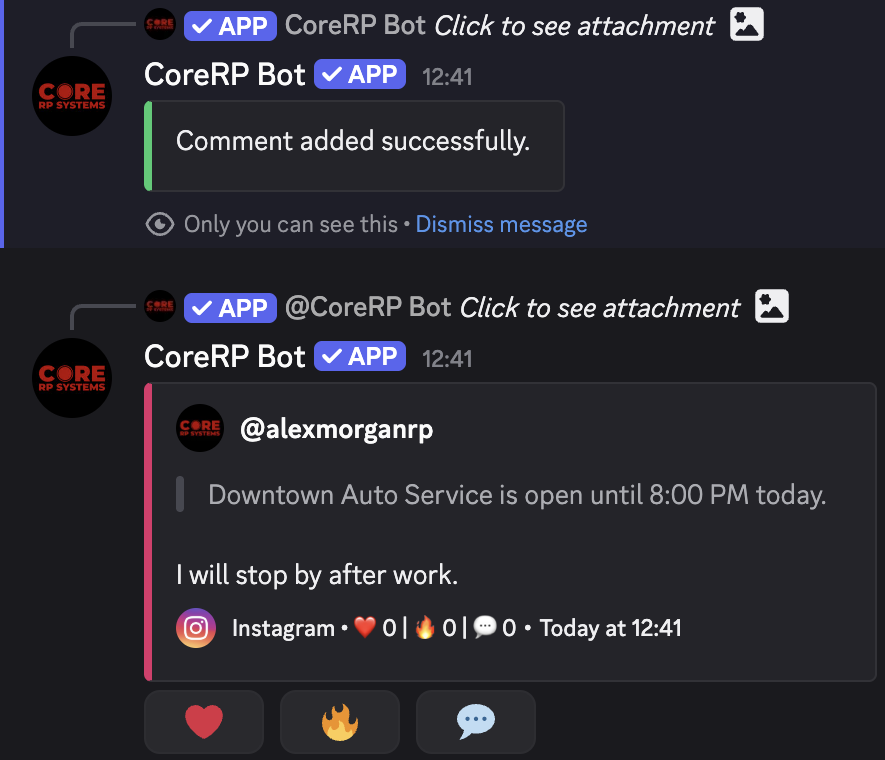
1,000characters in the required Comment field. - Submit the form and confirm Comment added successfully.
The comment appears as a public Discord reply. It includes a quote of up to 400 characters from the parent post and has its own reaction and comment controls, so replies can be nested.
Troubleshooting
- You do not have a citizen ID. — select the intended character.
- You do not have a social network account. You cannot comment. — create an account for the active character.
- You need to have a phone in your inventory to use the social network. — add a configured Phone item.
- This reaction is no longer available. — refresh the channel and use one of the post's current reactions.
- Comments are disabled for this social network. — ask an administrator to enable comments.
- Comment cannot be empty. — enter non-whitespace text.
Next steps
Learn how to submit and vote on server suggestions.