
Create a social network account and publish posts
Create a social account for your active character, then publish posts in the server's CoreRP social channel.
Before you begin
- Create and select the intended CoreRP character.
- An administrator must configure the social network and choose its channel.
- If Phone required is enabled, your active character needs an item in the Phone category, such as iPhone 17. A CoreRP phone number is not required.
Create your account
Check the active character and username before creating the account.
Run:
/social-network-account nick:alexmorgan
nick is the only option and is required. Use ASCII letters, numbers, underscores, periods, or hyphens. CoreRP removes leading @ symbols, spaces, emoji, and unsupported characters, then limits the username to 32 characters. The final username must be unique in the Discord server regardless of capitalization.
CoreRP privately confirms the saved username. Each character can have its own social account.
Publish a post
Posts are public. Review the text and image before sending.
- Open the configured Social network channel.
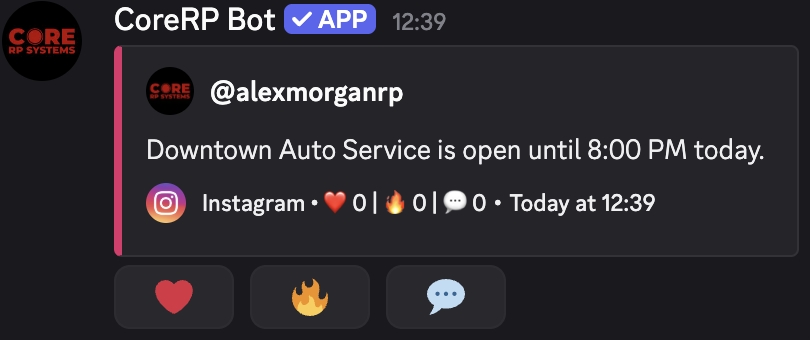
- Send a normal Discord message with text, one image, or both. There is no posting slash command.
- Confirm that CoreRP publishes the social post and removes your original message.
CoreRP uses only the first attachment, and it must be an image. The post shows your social username, avatar, content, configured reactions, and Comment when comments are enabled.
Troubleshooting
- You do not have a citizen ID. — create or select the intended character.
- You need to have a phone in your inventory to create a social network account. — add a configured Phone item to the active character.
- Invalid social network username. — use at least one supported character.
- This username is already taken! — choose another username.
- You already have a social network account! — use the existing account for that character.
- A message is not converted — use the configured social channel and confirm the feature is enabled.
- Images are disabled for this social network. — send a text-only post.
Next steps
Continue with Comment on and react to social network posts.