Receive restaurant order notifications
See new paid orders and their delivery details in the restaurant order thread.
Before you begin
- An administrator must set up the restaurant order thread and assign you either Restaurants delivery access or worker access for that restaurant.
- You need an active CoreRP character.
- You must be able to view the restaurant order thread.
You also need Discord access to the configured restaurant thread.
Receive an order
-
A customer completes the restaurant ordering workflow and submits payment.
-
CoreRP posts New food order in the restaurant order thread and mentions the assigned team.
-
Open the notification and review:
- every item, quantity, and extended price;
- the items price, fixed delivery fee, and total;
- the delivery address and customer note, or No note;
- the order timestamp.
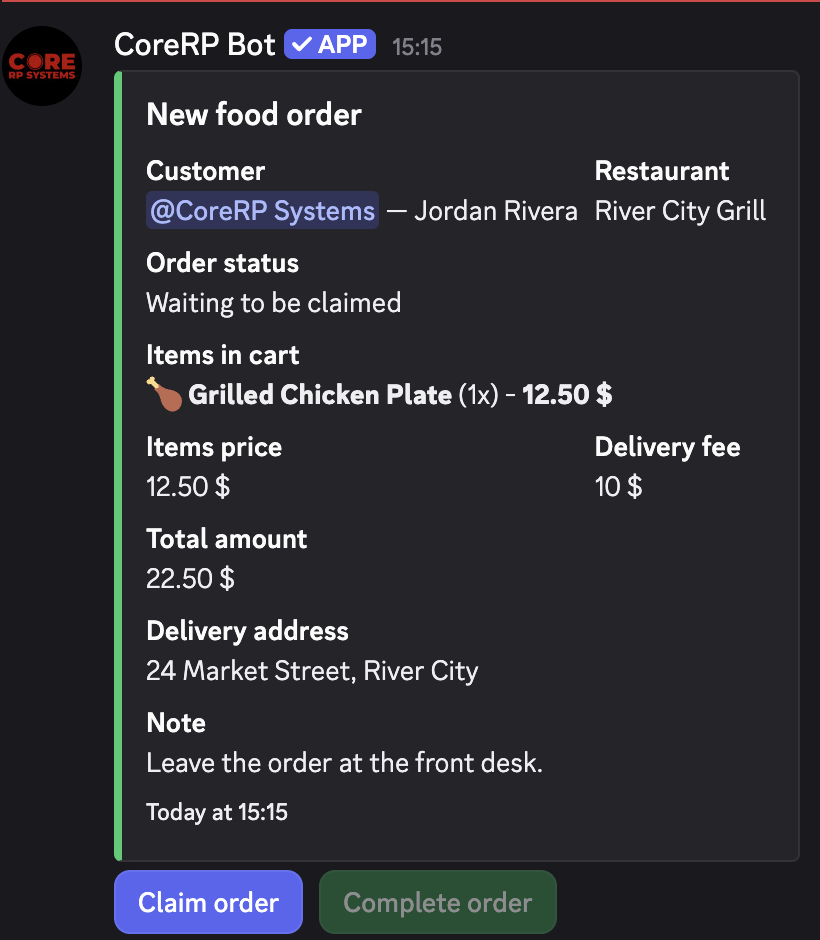
The delivery address and note are visible to everyone who can read the Restaurants log thread.
Troubleshooting
- No notification appears — make sure the customer completed payment and ask an administrator to check the configured Restaurants log thread and CoreRP's thread permissions.
- You are not mentioned — make sure the correct character is active and ask an administrator to check your restaurant access.
- You cannot open the thread — ask an administrator for access to the parent channel and the thread.
Next steps
Administrators can update restaurant notification assignments and the log thread.