Order food from a CoreRP restaurant
Build a restaurant cart, submit a delivery address, and place the order.
Before you begin
- Create and select the CoreRP character that will pay for the order.
- Your active character needs enough money for the food and delivery fee. Check it with View your balance and pay another citizen.
- An administrator must publish the Foodora panel.
Build the cart
-
Open the public Foodora - Food Delivery panel.
-
Select Order for the restaurant.
-
Select the items you want and submit your selection.
-
Select an item again to add another one.
-
Select View cart and check the items, delivery fee, and total.
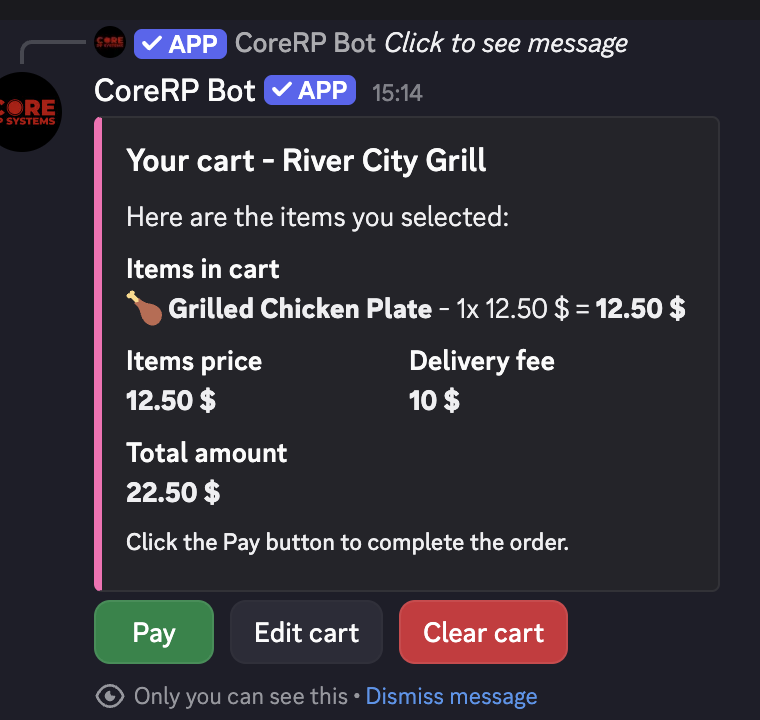
Use Edit cart to add more items or Clear cart to empty it.
Pay for the order
- In View cart, select Pay.
- In Enter delivery address, enter the required Delivery address, such as
24 Market Street, River City. - Optionally complete Order note (optional), such as
Leave the order at the front desk.
Keep both fields under 1,024 characters.
Submitting the form places the order and charges your active character immediately.
- Submit the form.
CoreRP privately shows ✅ Order successfully received with the order total, address, note, and estimated delivery time.
When restaurant notifications are configured, the assigned team receives the delivery details after payment.
Troubleshooting
- Your cart is empty or You do not have a cart to pay for — open Order, add at least one current menu item, and pay before opening a different restaurant.
- You do not have a citizen ID created — create or select the intended character and confirm that it has a primary account.
- Insufficient funds — compare the required total with the active character's primary balance.
Next steps
Continue with Receive restaurant order notifications as staff.