Deposit and withdraw cash at the ATM
Convert account balance into CoreRP banknotes or deposit matching banknotes back into a main or secondary account.
Before you begin
- Create and select the active character, then confirm it has a main account with View your balance and make a payment.
- To use Secondary account, first create the secondary account.
- A withdrawal needs sufficient balance. A deposit needs a matching combination of visible personal-inventory banknotes.
- The
/bankcommand, configured channel or role access, and configured command cooldown must allow you.
Enter a positive whole number using digits only, and review it before submitting.
Withdraw banknotes
Run:
/bank atm operation:Withdraw account:<Main account|Secondary account>
-
Select either Main account or Secondary account.
-
In the private ATM panel, choose
100,500,1000,5000, or Custom amount in the server's currency. -
For a custom withdrawal, enter a positive whole number divisible by
10. -
Under Select banknotes, choose one of the displayed distributions. CoreRP offers up to five combinations using denominations
10,20,50,100,200, and500.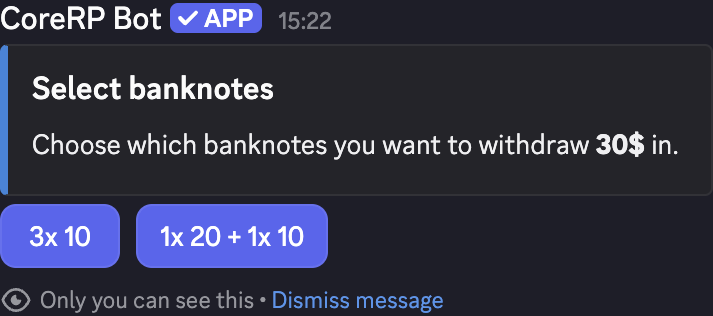
-
CoreRP debits the selected account, adds the banknotes to the active character's inventory, and replaces the panel with private Withdrawal successful.
For example, a custom amount of 30 can be offered as one 20 banknote plus one 10 banknote. Banknotes use the current server language and currency in names such as Banknote 20$.
Deposit banknotes
Run:
/bank atm operation:Deposit account:<Main account|Secondary account>
- Select the account that should receive the cash.
- In Cash deposit, enter a positive whole-number total divisible by
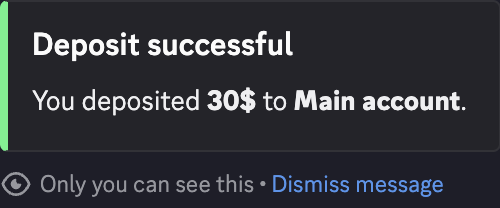
10. - Submit the modal. CoreRP removes a matching combination of current-currency banknotes, credits the selected account, and privately returns Deposit successful.
ATM actions have no fee or separate ATM cooldown. When Core log is configured, CoreRP sends an activity entry there. Run /bank account to view the updated balance.
Troubleshooting
- You do not have a bank account. or You do not have a secondary account. — select an existing account for the active character or create the missing secondary account first.
- An amount must be positive or a multiple of
10— enter a positive whole number using digits only. - Account ... does not have enough funds — lower the withdrawal amount or use another selected account.
- Could not find suitable banknote combinations for this amount. — choose a different multiple of
10; displayed combinations are limited. - You do not have a suitable combination of banknotes — run
/inventoryand compare the current banknote denominations, currency, and total with the deposit amount. - A setup, disabled-command, channel/role, or cooldown response — finish setup, enable
/bank, use an allowed channel or role, or wait for the configured cooldown.
Next steps
Continue with create, review, pay, and cancel invoices.