Buy fuel at the pumping station
Choose a fuel or EV-charging option, review its calculated total, and pay from your active character's main account.
Before you begin
- Create and select your CoreRP character.
- Your active character needs a main bank account with enough money for the calculated total. Check its balance with View your balance and pay another citizen.
- An administrator must configure pumping-station prices and publish the Gas Station panel.
- Use a channel and role allowed by the server's CoreRP command-access rules.
Buy fuel or charging
-
Open the public Shell fuel station panel and select Buy fuel.
-
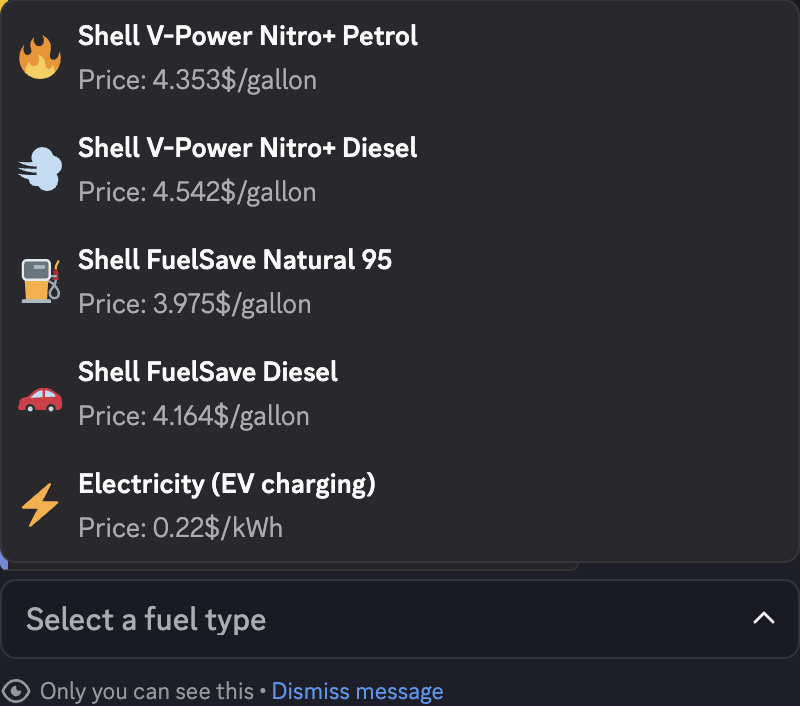
Choose one of the five options:
- Shell V-Power Nitro+ Petrol
- Shell V-Power Nitro+ Diesel
- Shell FuelSave Natural 95
- Shell FuelSave Diesel
- Electricity (EV charging)
-
Enter a positive amount in the modal. Liquid fuel uses the unit for the server's selected country; U.S. profiles show gallons. EV charging uses kWh. The field accepts up to six characters.
-
Submit the modal and review Confirm fuel payment, including the fuel, amount, unit, and two-decimal total.
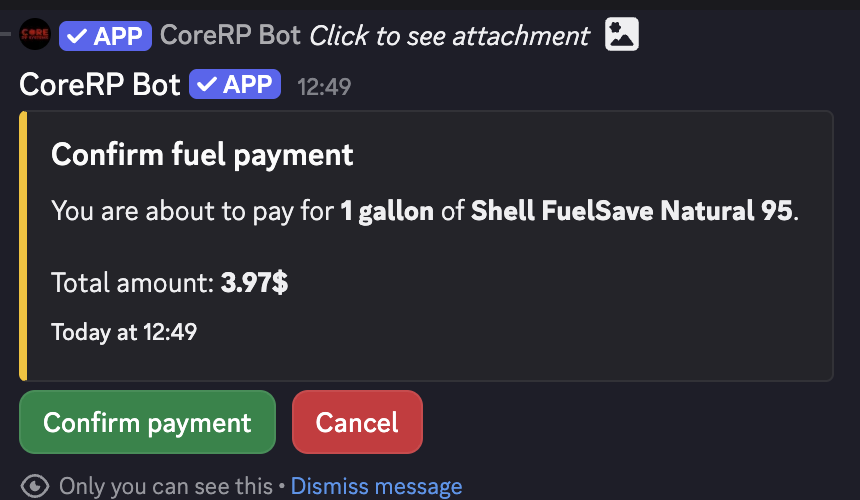
If the amount, unit, currency, or total differs from what you expected, select Cancel and restart the flow.
-
Check the amount, unit, and total, then select Confirm payment to charge the main account or Cancel to stop without a debit. After payment, the private success repeats the purchased fuel, amount, unit, and total.
Troubleshooting
- CoreRP rejects the amount — enter a positive numeric value using a period or comma as the decimal separator.
- CoreRP reports insufficient funds — lower the amount or check the active character's main-account balance.
- An ID-card, setup, disabled-command, or permission error appears — select the intended character and use a channel and role allowed for the pumping-station feature.
Next steps
Continue with Pay a water bill.