Create and list your CoreRP email accounts
Create a fictional CoreRP email address for your active character, then privately review that character's registered addresses.
Before you begin
- Complete CoreRP setup and select the character that should own the address.
- That active character must hold at least one inventory item currently configured as a phone.
/emailrequires the Discord Send Messages permission. Your server's command enabled, channel or role access, and configured cooldown rules must also allow it.- CoreRP allows up to two email addresses per active character.
CoreRP does not verify or create an external mailbox. Use a reserved example address, such as
jordan.rivera@example.com, rather than a personal email address. When Core log is configured, people who can read it can see your Discord member and the address you create.
Create an address
- Run
/email create. This command has no options. - In the Create email modal, enter the address under Enter your email address.
Use a format such as name@domain.example, with no spaces or extra @ characters. CoreRP removes spaces from the beginning and end and stores the address in lowercase.
- Select Submit. CoreRP privately confirms the stored address.
CoreRP does not direct-message you or send an external verification email. The private confirmation is the result of the creation.
List your addresses
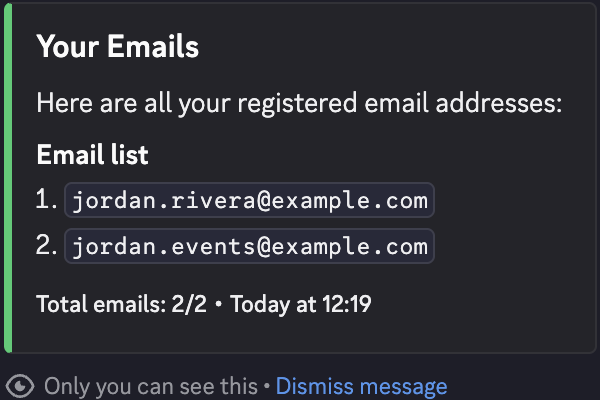
- Run
/email list. This command also has no options. - CoreRP privately shows a numbered Email list and Total emails: n/2 for your active character.
Switching characters changes which addresses these commands create and list. If an address must be removed, ask an administrator to follow Delete a member's CoreRP email account.
Troubleshooting
- You do not have a citizen ID. Create it in channel … — follow the channel mention in the response, or select the character that should use email.
- You need to have a phone in your inventory to use the email system. — obtain an item that the server currently configures as a phone, then try again with the same active character.
- You already have the maximum of 2 emails registered! — run
/email listand use an existing address, or ask an administrator to delete one. - Invalid email format! Try again. — use the
name@domain.examplestructure without spaces or an extra@. - This email already exists! Choose another. — enter a different fictional address.
- You do not have any email created! — confirm that the intended character is active. If you expected an address, retry
/email listbefore creating another one. - Server setup required, This command is currently disabled., You do not have permission to use this here., or a cooldown response — finish setup, enable
/email, use an allowed channel or role, or wait for the configured command cooldown.
Next steps
Continue with Send and read CoreRP email.