Buy CoreRP insurance
Buy one of the four CoreRP insurance types for your active character.
Before you begin
- Create and select your CoreRP character.
- Your active character needs a main bank account with enough money for the selected insurance. Check its balance with View your balance and pay another citizen.
- An administrator must configure insurance prices and publish the Insurance Company panel.
- The selected insurance must not already be owned or confiscated.
- Use a channel and role allowed by the server's CoreRP command-access rules.
Selecting an insurance button purchases it immediately. Review the insurance and price first.
Buy insurance
-
Open the public Insurance panel.
-
Choose one option:
- Health adds Health insurance.
- Life adds Life insurance.
- Accident adds Accident insurance.
- Property adds Property insurance.
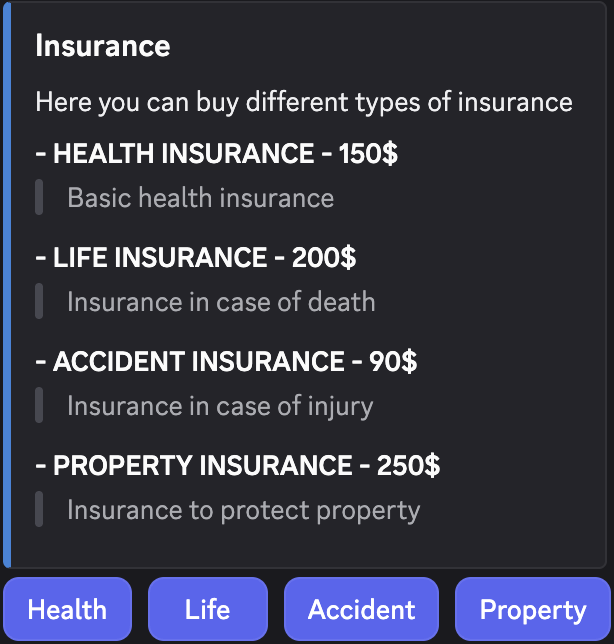
- Select the insurance you want to buy.
- Confirm that the private result names the insurance and exact price charged.
- Run
/inventoryand confirm that the exact insurance item appears once.
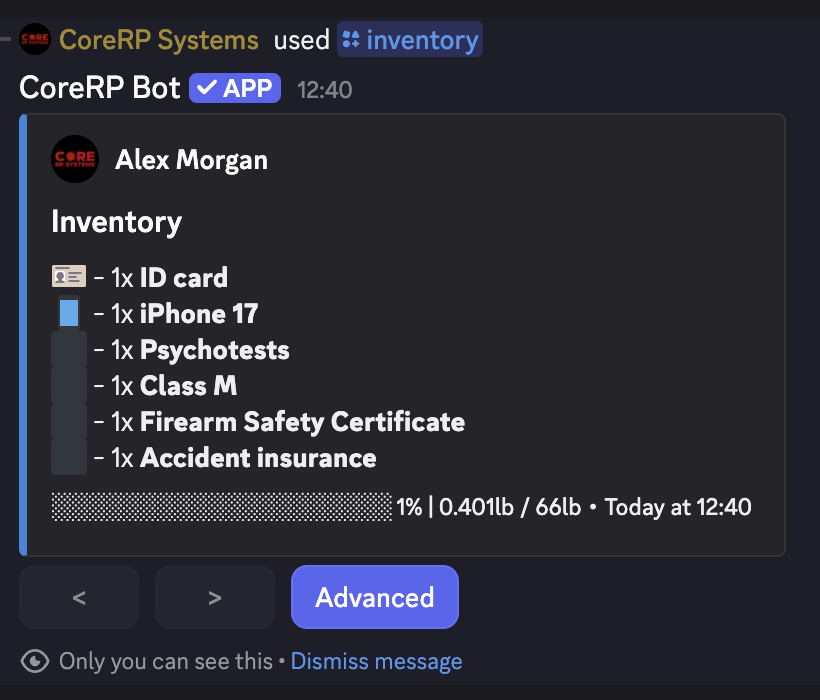
The item is permanent: ordinary inventory transfer and discard actions do not remove it.
Troubleshooting
- CoreRP says the insurance is already owned — each character can hold only one permanent copy of that insurance type.
- This permanent item was confiscated and cannot be purchased again. — ask a server administrator to restore the item; another copy cannot be purchased.
- CoreRP reports insufficient funds — compare the displayed price with the main-account balance.
- An ID-card, setup, disabled-command, or permission error appears — select the intended character and use a channel and role allowed for the insurance feature.
Next steps
Continue with View your inventory and item details.